How to Deploy Rails 8 Apps with Kamal to a VPS
Step-by-step guide to deploying Rails 8 applications with Kamal 2 to an Ubuntu VPS. Covers server setup, Docker configuration, SSL, and migrations.
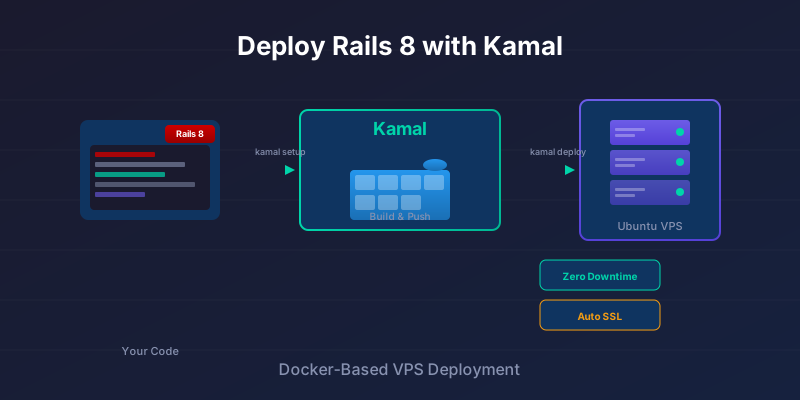
There’s something satisfying about running your own server. No surprise bills when traffic spikes, no vendor lock-in, no waiting for platform support tickets. With Rails 8 and Kamal, deploying to your own Ubuntu VPS is simpler than it’s ever been.
Kamal is a Docker-based deployment tool built by the Rails team. It handles zero-downtime deploys over plain SSH—no Kubernetes, no complex orchestration. You push code, Kamal builds a container, ships it to your server, and switches traffic once the new version is healthy. That’s it.
This guide walks through deploying a Rails 8 application to an Ubuntu VPS from scratch. We’ll cover server setup, Kamal configuration, SSL, and the ongoing workflow. We’ll also be honest about when this approach makes sense—and when it doesn’t.
Prerequisites
Before we start, you’ll need:
On your local machine:
- Ruby and Bundler installed
- Docker installed (and your user added to the
dockergroup) - A Rails 8 application ready for production
On the VPS:
- Ubuntu 22.04 or 24.04 LTS
- Root or sudo access over SSH
- At least 1 GB RAM for a small Rails app (2 GB recommended)
External services:
- A Docker registry account (Docker Hub, GitHub Container Registry, or similar)
- A domain name with DNS access (optional but recommended for SSL)
How Kamal Works
Kamal’s workflow is straightforward:
- Build a Docker image of your app locally (or in CI)
- Push the image to your container registry
- Pull the image on your VPS
- Start new containers and run health checks
- Switch traffic to the new version via kamal-proxy
- Stop the old containers
The magic happens in step 5. Kamal uses kamal-proxy (a lightweight Traefik-based reverse proxy) to route traffic. It only switches to the new container once health checks pass, giving you zero-downtime deploys without complicated load balancers.
Two files drive everything:
config/deploy.yml— your deployment configuration.kamal/secrets— environment secrets (keep this out of git)
Preparing the Ubuntu VPS
Spin up an Ubuntu VPS on your preferred provider—Hetzner, DigitalOcean, Linode, Vultr, or any other. Pick Ubuntu 22.04 or 24.04 LTS for long-term support.
Basic Server Hardening
Once your VPS is running, SSH in as root and set up a deploy user:
# Create deploy user with sudo access
adduser deploy
usermod -aG sudo deploy

# Set up SSH key authentication
mkdir -p /home/deploy/.ssh
cp ~/.ssh/authorized_keys /home/deploy/.ssh/
chown -R deploy:deploy /home/deploy/.ssh
chmod 700 /home/deploy/.ssh
chmod 600 /home/deploy/.ssh/authorized_keys
Disable password authentication in /etc/ssh/sshd_config:
PasswordAuthentication no
Then restart SSH: systemctl restart sshd
Firewall Setup
Enable the firewall and open only what you need:
ufw allow OpenSSH
ufw allow http
ufw allow https
ufw enable
Test Connectivity
From your local machine, confirm you can SSH in:
ssh deploy@your_server_ip
If this works, you’re ready for Kamal. Don’t worry about installing Docker—Kamal handles that on the first deploy.
Preparing Your Rails App
Rails 8 ships with Docker support out of the box. If you generated a new Rails 8 app, you already have a Dockerfile in your project root.
For existing apps upgrading to Rails 8, run:
rails app:update
This generates the Dockerfile and related configuration.
Key Environment Variables
Make sure your app respects these environment variables in production:
# config/database.yml
production:
  url: <%= ENV["DATABASE_URL"] %>
# config/environments/production.rb
config.force_ssl = true
config.assume_ssl = true
config.log_level = ENV.fetch("RAILS_LOG_LEVEL", "info")
Local Sanity Check
Before involving Kamal, verify your app builds and runs in Docker:
docker build -t myapp .
docker run --rm -e RAILS_MASTER_KEY=$(cat config/master.key) myapp
If it starts without errors, you’re in good shape.
Setting Up Kamal
Add Kamal to your project:
bundle add kamal
bundle exec kamal init
This creates two files:
config/deploy.yml— deployment configuration.kamal/secrets— for sensitive values (already in.gitignore)
Configuring deploy.yml
Here’s a minimal configuration for a single-server deploy:
# config/deploy.yml
service: myapp
image: yourusername/myapp

servers:
  web:
    - your_server_ip
  # job:
  #   - your_server_ip
  #   cmd: bin/jobs

proxy:
  ssl: true
  host: app.example.com

registry:
  username: yourusername
  password:
    - KAMAL_REGISTRY_PASSWORD

env:
  clear:
    RAILS_ENV: production
    RAILS_LOG_TO_STDOUT: "true"
    RAILS_SERVE_STATIC_FILES: "true"
  secret:
    - RAILS_MASTER_KEY
    - DATABASE_URL
A few notes:
- service: A name for your app (used in container names)
- image: Where to push/pull the Docker image
- servers.web: Your VPS IP address
- proxy.ssl: Enables automatic Let’s Encrypt certificates
- proxy.host: Your domain (must have DNS pointing to the server)
- env.clear: Non-sensitive environment variables
- env.secret: References to secrets defined in
.kamal/secrets
Running Background Jobs
If you’re using Solid Queue or Sidekiq, uncomment the job section and add:
servers:
  job:
    - your_server_ip
    cmd: bin/jobs
This runs your job processor as a separate container on the same server.
Database as an Accessory
You can run PostgreSQL on the same server using Kamal accessories:
accessories:
  db:
    image: postgres:16
    host: your_server_ip
    port: 5432
    env:
      clear:
        POSTGRES_DB: myapp_production
      secret:
        - POSTGRES_PASSWORD
    directories:
      - data:/var/lib/postgresql/data
For production, consider a managed database (AWS RDS, DigitalOcean Managed Databases) instead—backups, replication, and maintenance are handled for you.
Managing Secrets
Kamal 2 loads secrets from .kamal/secrets automatically. Create this file:
# .kamal/secrets
KAMAL_REGISTRY_PASSWORD=your_registry_token
RAILS_MASTER_KEY=your_master_key_here
DATABASE_URL=postgres://user:password@localhost/myapp_production
POSTGRES_PASSWORD=your_db_password
You can also use shell commands to pull secrets dynamically:
# .kamal/secrets
RAILS_MASTER_KEY=$(cat config/master.key)
Keep .kamal/secrets out of version control. It should already be in your .gitignore.
First Deploy
With everything configured, run the initial setup:
bundle exec kamal setup
This connects to your server over SSH and:
- Installs Docker if needed
- Pulls and starts kamal-proxy
- Creates necessary directories
- Prepares the environment
Then deploy your app:
bundle exec kamal deploy
Kamal will:
- Build your Docker image locally
- Push it to your registry
- Pull it on the VPS
- Start the new container
- Run health checks
- Switch traffic once healthy
The first deploy takes longer (downloading base images, warming caches). Subsequent deploys are faster.
Verify It’s Running
Check your server’s IP in a browser, or if you’ve configured SSL and DNS:
curl https://app.example.com
You should see your Rails app.
Domain and SSL
If you haven’t already, point your domain to your VPS:
- In your DNS provider, create an A record:
app.example.com → your_server_ip - Wait for DNS propagation (usually minutes, sometimes hours)
- Ensure
proxy.hostindeploy.ymlmatches your domain - Redeploy:
kamal deploy
Kamal’s proxy automatically requests a Let’s Encrypt certificate. You’ll have HTTPS working without touching Nginx or Certbot.
Migrations and One-Off Tasks
Automatic Migrations with Post-Deploy Hook
The cleanest approach is running migrations automatically after each deploy. Add a post-deploy hook to your deploy.yml:
# config/deploy.yml
hooks:
  post-deploy: .kamal/hooks/post-deploy
Then create the hook script:
# .kamal/hooks/post-deploy
#!/bin/sh
kamal app exec "bin/rails db:migrate"
Make it executable:
chmod +x .kamal/hooks/post-deploy
Now every kamal deploy will automatically run migrations after the new containers are up. This keeps your deploy workflow simple—one command does everything.
Running Commands Manually
For one-off tasks, you can still run commands directly:
# Open a Rails console
kamal app exec -i "bin/rails console"

# Run seeds or data migrations
kamal app exec "bin/rails db:seed"

# Any arbitrary command
kamal app exec "bin/rails runner 'puts User.count'"
Common Commands
Here’s a quick reference for day-to-day operations:
| Command | What it does |
|---|---|
kamal deploy |
Build, push, and deploy the latest code |
kamal app logs |
Tail application logs |
kamal app logs -f |
Follow logs in real-time |
kamal app exec "cmd" |
Run a command in the app container |
kamal app exec -i bash |
Interactive shell |
kamal details |
Show container and server status |
kamal rollback |
Roll back to the previous release |
kamal proxy logs |
View proxy/router logs |
For debugging failed deploys, start with kamal app logs and kamal details.
Hardening and Best Practices
System Level
- Keep Ubuntu updated:
apt update && apt upgraderegularly, or enable unattended-upgrades - Install fail2ban: Blocks repeated failed SSH attempts
- Monitor disk space: Docker images accumulate; run
docker system pruneperiodically
Application Level
- Use strong secrets: Generate random passwords for databases and keys
- Configure health checks: Kamal’s default health check hits
/up—make sure this endpoint exists and returns 200 when your app is ready - Set resource limits: On small VPS instances, constrain container memory to prevent OOM kills:
# config/deploy.yml
servers:
  web:
    - your_server_ip
    options:
      memory: 512m
Backups
If you’re running PostgreSQL on the same server, set up automated backups. A simple cron job with pg_dump to an offsite location (S3, Backblaze B2) works. For managed databases, enable automated backups through your provider.
When NOT to Use Kamal + VPS
Let’s be honest about trade-offs.
Kamal + VPS Shines When:
- You want predictable monthly costs ($5-50/month vs usage-based pricing)
- You need full control over the server environment
- You’re comfortable with basic Linux administration
- Your app runs fine on a single server (or you’re ready to scale horizontally later)
- You want simple, reproducible deploys without vendor lock-in
Consider Managed Platforms When:
- You need to move fast and don’t want to think about servers (Heroku, Render, Fly.io)
- Compliance requirements demand certified infrastructure (SOC 2, HIPAA)
- Your team has no ops experience and can’t afford downtime during learning
- You need instant horizontal scaling or global edge deployment
Risks to Consider:
- Single point of failure: If your VPS goes down, your app goes down. Managed platforms handle failover automatically.
- Security is your responsibility: You patch the OS, configure firewalls, monitor for intrusions.
- No built-in observability: You’ll need to set up logging, monitoring, and alerting yourself (Datadog, Honeybadger, or self-hosted alternatives).
For solo developers and small teams building straightforward web apps, Kamal + VPS is often the sweet spot. For larger teams or apps with strict uptime requirements, the operational overhead of managed platforms may be worth paying for.
Where to Go From Here
Once you’re comfortable with single-server deploys, consider:
CI/CD Automation: Run kamal deploy from GitHub Actions on push to main. This removes the “deploy from laptop” step and ensures consistent builds.
Multi-Environment Setup: Use Kamal destinations to manage staging and production:
kamal deploy -d staging
kamal deploy -d production
Scaling: Add more servers to servers.web and Kamal distributes deploys across them. Or move your database to a managed service and add a second VPS for redundancy.
Accessories vs Managed Services: Running PostgreSQL and Redis on your VPS is fine for development and small apps. For production workloads, managed databases (with automatic backups, replication, and failover) reduce operational burden significantly.
Wrapping Up
Kamal gives you a straightforward path from code to running application. One tool, one configuration file, zero-downtime deploys. Combined with an affordable Ubuntu VPS, you get predictable costs and full control over your infrastructure.
It’s not the right choice for everyone—managed platforms exist for good reasons. But for developers who want to understand their stack and keep things simple, Kamal is a solid option.
Start with a single server. Get comfortable with the workflow. Scale when you need to.