Odoo API Integration in 2026: JSON-2, Webhooks, Dashboards
Odoo API integration in 2026: JSON-2 in Odoo 19, native webhooks, plan limits, rate ceilings, external IDs, and warehouse-backed reporting.
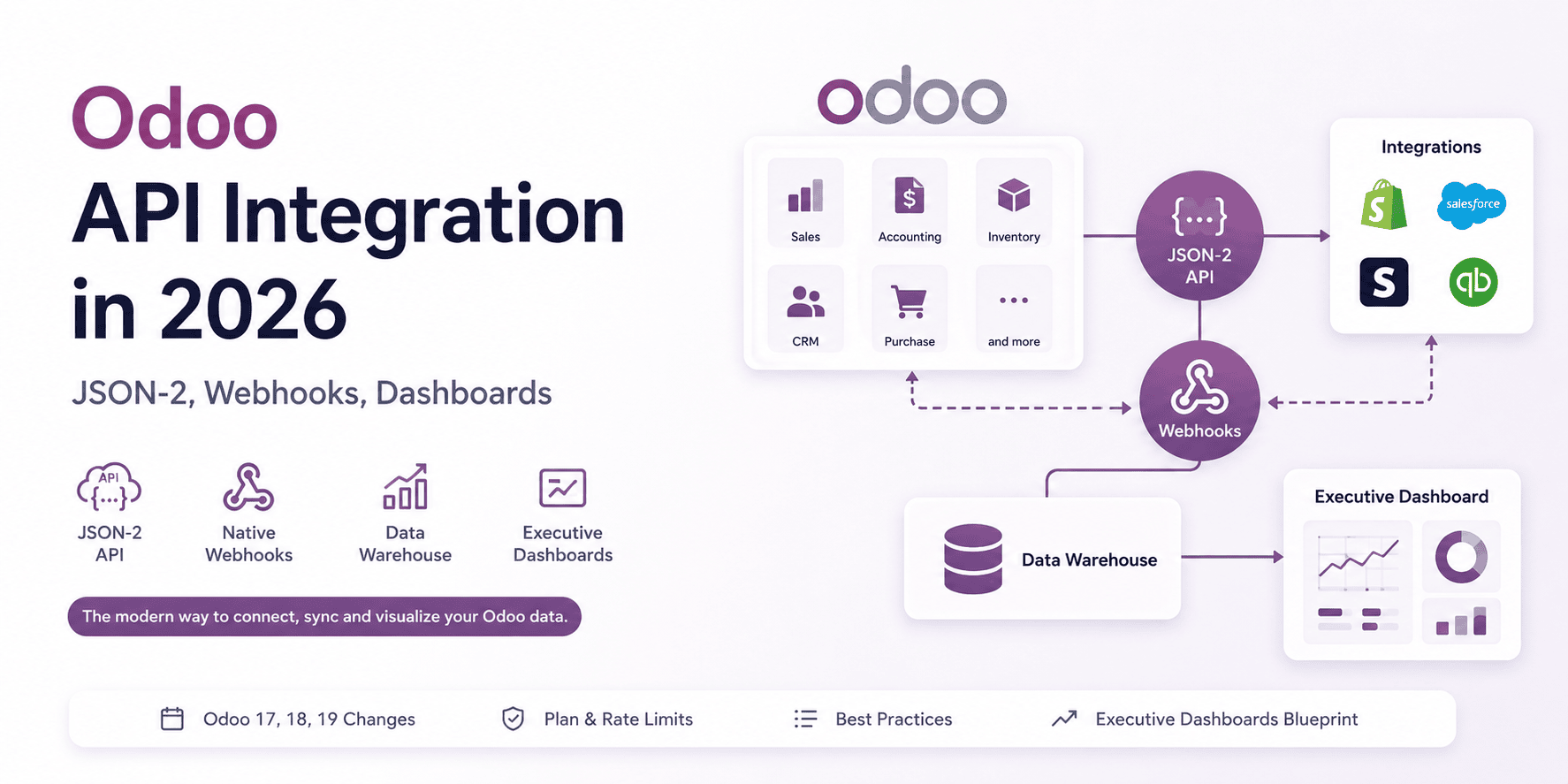
The Odoo API is useful because the web client is not a boundary. Sales orders, invoices, contacts, stock moves, and CRM leads are all records behind the UI, and the External API lets another system read or write those records without someone exporting a spreadsheet first.
The architecture is not the Odoo-specific part. The same auth-sync-reporting stack shows up against Xero and carries over to any ERP. What is Odoo-specific is the timing: Odoo 19 made JSON-2 the baseline for new work. Older tutorials fail at the first step because they authenticate with a username and password over XML-RPC; on a new Odoo 19 integration, start with an API key and the JSON-2 endpoints.
Version-sensitive claims in this post depend on Odoo's documentation and acceptable-use policy. Recheck the release notes, pricing plan, and your database's generated /doc page before treating any endpoint, plan limit, or removal date as fixed.
Odoo API surface
The Odoo API is the External API that gives outside applications programmatic read and write access to every record in an Odoo ERP database. As of Odoo 19 (released September 2025) it is exposed as the modern JSON-2 API, with the legacy XML-RPC and JSON-RPC endpoints deprecated but still functional. Odoo's documentation schedules those older protocols for removal in Odoo 22 (self-hosted, around fall 2028) and Odoo Online 21.1 (SaaS, around winter 2027). Treat those as dates to verify against current release notes before you plan a migration, not as a guarantee that every hosted database changes on the same day. Access is gated to the Custom plan or any self-hosted deployment.
Odoo is built on a simple philosophy: everything is a model. A customer is a record in the res.partner model, a sales order lives in sale.order, an invoice in account.move, a product in product.product. The API lets external systems read and write those models directly, which is what you need for reporting, syncing, and automation.
| What you can access | Odoo model | What you can build |
|---|---|---|
| Customers, vendors, contacts | res.partner |
Client portals, CRM sync, deduplicated master data |
| Sales orders and quotes | sale.order |
Pipeline dashboards, channel revenue analysis |
| Invoices and payments | account.move |
AR aging reports, cash flow dashboards, board packs |
| Inventory and stock moves | stock.quant, stock.move |
Multi-warehouse rollups, days-of-supply monitoring |
| CRM leads and opportunities | crm.lead |
Lead capture from web forms, conversion reporting |
| Products and pricing | product.product |
Catalog sync to e-commerce, margin analysis |
Making Your First JSON-2 API Call
A first call against the JSON-2 API is two things: an API key in an Authorization header, and a POST to a model's method. There is no separate login round trip the way the old XML-RPC flow needed, which is most of why the new API is nicer to work with. Here is a read from Ruby with Faraday, pulling the ten most recent customers:
require "faraday"

# For JSON-2, authenticate with an API key rather than a password. Generate one
# under Preferences > Account Security. Duration is required; Odoo caps keys at
# three months max, so long-running integrations must rotate at least that often.
ODOO_URL = "https://your-company.odoo.com"

client = Faraday.new(url: ODOO_URL) do |f|
  f.request :json   # encode the request body as JSON
  f.response :json  # parse the response body as JSON
  f.headers["Authorization"] = "Bearer #{ENV.fetch('ODOO_API_KEY')}"
end

# res.partner holds everyone (customers, vendors, contacts), so filter on
# customer_rank to get actual customers. search_read filters and returns the
# fields you ask for in a single round trip, which keeps you under the rate limit.
response = client.post("/json/2/res.partner/search_read") do |req|
  req.body = {
    domain: [["customer_rank", ">", 0]],
    fields: %w[name email country_id],
    limit: 10,
    order: "create_date desc"
  }
end

response.body.each do |partner|
  puts "#{partner['name']} <#{partner['email']}>"
end
The endpoint shape is /json/2/<model>/<method>, and the exact models, methods, and custom fields available on your instance are listed in the per-database documentation page Odoo 19 auto-generates. search_read is the one call you reach for most: it combines a search with a field read, so you avoid the classic two-step of fetching IDs and then fetching records.
Your Odoo version and your plan determine almost everything else about the integration, including whether the JSON-2 endpoints above exist on your instance at all.
What Changed in Odoo 17, 18, and 19
Odoo 17 (October 2023) introduced native webhooks. Odoo 19 (September 2025) introduced the JSON-2 External API, uses API keys for that flow, and marks the old XML-RPC and JSON-RPC endpoints as deprecated but still functional.
| Version | Released | What it meant for integrations |
|---|---|---|
| Odoo 17 | October 2023 | Native webhooks arrived, cutting most integrations' reliance on polling. |
| Odoo 18 | October 2024 | No major External API direction change. |
| Odoo 19 | September 2025 | New JSON-2 API, API keys for JSON-2, the old endpoints deprecated. |
JSON-2 is the change that actually affects your code. The legacy XML-RPC and JSON-RPC endpoints, the ones that power virtually every existing connector and every "Odoo API integration" tutorial written before late 2025, are now formally deprecated. Odoo's own documentation schedules them for removal in Odoo 22 (self-hosted, around fall 2028) and Odoo Online 21.1 (SaaS, around winter 2027), replaced by JSON-2. That does not mean every existing connector fails tomorrow, but it does mean every new integration you build on the old endpoints is a migration you are signing up for.
| Protocol | Introduced | Status in Odoo 19 | Removal target |
|---|---|---|---|
| XML-RPC | Pre-Odoo 8 | Deprecated, still functional | Odoo 22 (~fall 2028) self-hosted / Online 21.1 (~winter 2027); verify before planning |
| JSON-RPC | Odoo 8 era | Deprecated, still functional | Odoo 22 (~fall 2028) self-hosted / Online 21.1 (~winter 2027); verify before planning |
| JSON-2 API | Odoo 19 (September 2025) | Recommended for all new work | Current standard |
For JSON-2, use API keys rather than username/password authentication. Do not use old XML-RPC username/password examples as the baseline for new Odoo 19 work. You set an API key's duration when you create it (description and duration are both required). For security reasons, Odoo's docs cap keys at three months maximum, so a long-running integration must rotate at least once every three months - shorter durations for interactive or high-privilege keys, and rotation baked into the integration from day one. See the External API: API Keys section for the current rule.
The third change is a developer-experience upgrade: every Odoo 19 database now auto-generates a live API documentation page listing every model and method on your specific instance, including any custom fields your team added. That removes a lot of guesswork from scoping an integration.
Odoo 19 also leaned hard into AI, adding database-querying AI agents, natural-language "Ask AI" search, AI-assisted invoice scanning, and AI-generated dashboards. If compliance matters, review the data-flow documentation for Odoo's AI features before enabling them in regulated or air-gapped environments.
For an integration team weighing an Odoo 18 to 19 upgrade: 17 broke views, 18 was gentle, 19 changed the API direction. Nothing stops working on upgrade day, the old endpoints still answer, but new work should target JSON-2 and every existing XML-RPC or JSON-RPC integration now needs a migration plan on its roadmap. Budget accordingly.
Which Odoo Plans Have API Access?
The Odoo External API is only available on the Custom plan or a self-hosted deployment. The One App Free and Standard plans on Odoo Online do not expose it at all. This is the most common surprise in early-stage Odoo integration projects.
| Plan | Hosting | External API access | Custom modules | Studio | Multi-company |
|---|---|---|---|---|---|
| One App Free | Odoo Online | Not available | No | No | No |
| Standard | Odoo Online | Not available | No | Limited | No |
| Custom | Odoo Online, Odoo.sh, or self-hosted | Full access | Yes | Full | Yes |
If a business tells me they are on Standard and they want a custom dashboard, the first conversation is about a plan upgrade, not about architecture. Sort this out on day one.
The same Custom-plan gate applies to Odoo Studio, custom modules, and multi-company support, so a business with any real integration ambition is almost always on Custom already. Check before you assume.
The Gotchas Nobody Mentions
Odoo trips up first-time integrators in a handful of predictable places. None of them are dealbreakers; all of them are cheaper to learn before the first sync run than after it.
A "partner" is everyone. In Odoo, the res.partner model holds customers, vendors, employees, and contacts all at once. A single contact can be both a customer and a vendor simultaneously. Companies and the people who work at them are linked through a parent and child relationship. Get this wrong during a data import and you create thousands of duplicate or orphaned records, which is the most common way an Odoo CRM integration goes sideways in week one.
Relational fields have their own grammar. When you link records over the API, such as adding a product line to an order, Odoo does not accept a plain list of IDs. It expects the ORM command tuple syntax documented under Relational Fields. For example, linking an existing set of records uses a small instruction tuple:
# Replace a record's tags with a specific set
'tag_ids': [(6, 0, [12, 15, 23])]
That (6, 0, [...]) is not a typo, it is Odoo's way of saying "replace the whole set." There are similar commands to add a new record (0), update fields on a linked record (1), unlink (3), or clear the whole set (5). Your integration partner needs to know this exists, because the error messages when you get it wrong are unhelpful in the extreme.
External IDs matter more than database IDs. Records created through the Odoo interface do not automatically get a stable external identifier. If you plan to update Odoo records from an outside system, assign external IDs at creation time. Concretely: import your Shopify customers into res.partner without external IDs, and the second sync has no way to distinguish "update this partner" from "create a duplicate" - there is no key to match on. The fallback of matching on email either duplicates every customer whose address changed or overwrites the wrong partner when two contacts share an address. Skip external IDs and you are one re-sync away from cleaning that up by hand.
Timezones will catch you. Odoo stores every timestamp in UTC but displays it in each user's local timezone. Ask the API for "today's invoices" using the wrong boundary and your finance team in Singapore will see transactions from the wrong day. Always be explicit about timezone in any reporting integration.
Multi-company and multi-currency are effectively different products. If a business runs several legal entities in one Odoo database, every query needs an explicit company filter or you will mix data across entities. Multi-currency adds automatic exchange-rate journal entries that your integration must respect rather than fight. These are solvable, but they are not free.
Community vs Enterprise changes the surface. Both editions expose the same External API, but Odoo Community and Enterprise differ in what data exists to integrate against. Community has invoicing but not full double-entry accounting, and it lacks Studio, so there are fewer custom fields to handle but also fewer features to build on. Confirm which edition you are dealing with before you promise anyone "Odoo handles the accounting."
Odoo API Rate Limits
Odoo Online throttles the External API to roughly one call per second with no parallel requests, per its acceptable use policy. Odoo.sh and self-hosted deployments have no such fixed limit; they are bound only by the resources you give them.
| Deployment | Rate limit | What it forces you to do |
|---|---|---|
| Odoo Online (SaaS) | ~1 call/sec, no parallel calls | Batch reads with search_read, sync bulk extractions overnight, prefer webhooks over polling |
| Odoo.sh | Bound by your instance's workers and resources | Size workers to your traffic; still avoid hammering shared infrastructure |
| Self-hosted | Bound by your own hardware and worker config | You own the ceiling; tune workers and database connections to match |
On Odoo Online, constant polling is a non-starter. A job that reads ten thousand records one at a time would take nearly three hours and lock out every other integration sharing the key. Reach for search_read to pull many records per call, schedule large jobs for off-hours, and let webhooks tell you when something changed instead of asking on a loop.
Does Odoo Support Webhooks?
Yes. Odoo has supported native webhooks since Odoo 17 (October 2023), for both incoming and outgoing events, configured without code from Settings, Technical, Automation Rules. Odoo 19 added webhook management and call logging inside Studio. If your design depends on automatic retry or a manual resend of failed deliveries, verify that behavior in your Odoo version first rather than assuming it. Webhooks should still be the default trigger for any modern Odoo integration.
Before Odoo 17 there was no native way for the platform to tell an outside system "something just happened"; you had to poll, which bumps straight into that one-call-per-second ceiling on Odoo Online. The two directions now available:
- Incoming webhooks trigger an automation when an outside system calls in
- Outgoing webhooks fire a notification to your application the moment a record changes
If you are building anything that needs to react when an order is confirmed, an invoice is paid, or a lead comes in, use webhooks rather than a polling job. But treat the webhook as the trigger for a sync, not as the sync itself. Deliveries fail, someone disables an automation rule while debugging and forgets to re-enable it, and no webhook will ever tell you about records that changed before the rule existed. Keep a scheduled reconciliation job, nightly is usually enough, that compares Odoo against the target system and repairs the drift. One more thing to flag with your integration partner: webhooks need extra configuration in multi-database deployments.
Caution: many third-party automation tools were slow to adopt Odoo 19's new endpoints. As of late 2025, some popular no-code connectors were still calling the deprecated APIs and triggering Odoo's removal warnings. If you are relying on an off-the-shelf connector like Zapier or Make, confirm it supports the JSON-2 API before you build a process around it.
The Two Directions an Odoo Integration Usually Takes
Most Odoo ERP integration projects fall into one of two directions: pull records out for reporting, or push records in so another system stops being copied by hand.
Pulling data out of Odoo is the more common direction, usually in service of reporting and visibility:
| Use case | Why it needs the API |
|---|---|
| Executive dashboards | Combine Odoo with Shopify, Stripe, or HubSpot on one screen |
| Cross-channel margin analysis | Blend marketplace fees, e-commerce orders, and Odoo cost data |
| Real-time KPI monitoring | Put live orders, delivery rates, and SLAs on an office screen |
| Financial reporting beyond Odoo | Board packs, multi-entity consolidation, scenario planning |
| Inventory and supply-chain views | Multi-warehouse rollups and days-of-supply by product |
Pushing data into Odoo is about keeping the operational system in sync:
| Use case | What it replaces |
|---|---|
| E-commerce order sync | Manual re-keying of Shopify or WooCommerce orders |
| CRM lead capture | Copying web-form submissions into Odoo by hand |
| Automated invoicing | Manually drafting recurring or usage-based invoices |
| Data migration | One-time bulk imports from a legacy ERP |
How to Build an Executive Dashboard on Top of Odoo
To build an Odoo executive dashboard, pull data through the JSON-2 API or replicate it into a data warehouse, model it cleanly outside Odoo, and keep the dashboard off the live ERP. Six KPIs at one level of drill-down is enough for an executive view. The dashboard tool is the final step; the real work is extracting Odoo data safely, modelling it outside the live ERP, and deciding which KPIs are allowed to be slightly stale.
The most requested Odoo dashboard project I see is some version of this brief:
Our CEO wants one screen showing pipeline, revenue, cash, and inventory, pulling from Odoo plus our other systems.
- Pick six KPIs, not sixty. A good executive view answers one question: is the business on track this week? A typical set:
- Net new revenue
- Gross margin
- Days sales outstanding (DSO)
- Pipeline coverage
- Inventory days of supply
- Customer satisfaction
Each gets a current value, a trend line, and one level of drill-down. Resist the urge to add more.
-
Map each KPI to its source. Revenue and margin come from
account.moveandsale.orderin Odoo. Receivables come from Odoo's aged reports. Pipeline comes fromcrm.lead. Inventory comes from the stock models. Customer satisfaction usually lives outside Odoo entirely, in a survey tool, which is the reason you build this layer outside Odoo in the first place. -
Choose how you extract. For modest volumes, call the Odoo JSON-2 API on a schedule, say every fifteen minutes during business hours. For larger volumes, replicate Odoo data continuously into a small data warehouse (think BigQuery, Snowflake, or Postgres), syncing only what changed since the last run.
-
Model the data in a warehouse, not in the dashboard. Land your Odoo data in a clean, simple data model in a warehouse, then point the dashboard at the warehouse. This shields your dashboard from Odoo's annual model changes and keeps your live ERP fast for the people actually running the business. If the warehouse is storing periodic snapshots rather than current state, that is append-only time-indexed data, which plain PostgreSQL handles well into the millions of rows. TimescaleDB earns its operational cost only past that, which a sync of ERP snapshots takes years to reach.
-
Pick the visualization layer last. Power BI, Tableau, Metabase, Looker, Superset, or a custom front end can all work. The deployed dashboard connects to your warehouse, never directly to live Odoo.
- Add governance up front. Decide who sees what, how often it refreshes, and who can change it before you launch, rather than after someone sees a number they should not have.
When Odoo Should Not Be the Reporting Layer
Odoo's native dashboards are good, and Odoo 19 made them better with AI-assisted creation and natural-language queries. For a single department watching its own numbers, native Odoo business intelligence is often enough. Businesses outgrow it at a few predictable boundaries.
| When you hit this | Stop doing this | Start doing this |
|---|---|---|
| Database grows past roughly 10 GB | Running analytics on the live instance | Replicate to a data warehouse |
| More than 5 systems to connect | Point-to-point integrations | Build a central middleware hub |
| Need sub-second event reactions | Polling on a schedule | Native Odoo webhooks |
| Multi-entity or multi-country | Assuming the integration is generic | Account for localization and company filters |
| Executives want one URL | "Log in to Odoo and click through three menus" | A dedicated dashboard on top of a warehouse |
At those boundaries, I stop asking the live ERP to be the reporting engine. Keep Odoo for transactions, replicate the records you need into a warehouse, and let the dashboard read from that copy.
What I Would Build
For Odoo Online, I would keep the integration deliberately boring: one queue for API reads, no parallel calls against the same database, search_read for batched extraction, external IDs for every imported record, and webhooks that enqueue sync jobs rather than doing work inline.
The reconciliation job is not optional. Webhooks tell you that something happened; they do not prove both systems are consistent. Run a nightly reconciliation that checks the records your integration owns, repairs drift where safe, and reports anything that needs human review.
What I Would Not Build
I would not build a new XML-RPC integration in 2026 unless I was maintaining legacy code. I would not sync customer records without external IDs. I would not let webhook handlers write directly to downstream systems without a queue. And I would not promise real-time dashboards on Odoo Online without first checking the one-call-per-second API ceiling.
Illustrative Scenario: A B2B Distributor on Odoo Enterprise
Use this as a worked example, not a case study. Picture a mid-sized B2B distributor running on Odoo Enterprise with around 120 employees. They sell through three channels:
- A direct sales team on Odoo CRM
- A B2B e-commerce site
- A presence on an industrial-supply marketplace
They operate two legal entities, hold inventory in three warehouses, and outsource fulfillment. This is a composite company, but the integration shape is common enough to be useful: Odoo owns core records, while revenue, marketplace fees, and fulfillment status live partly elsewhere.
The problem: the finance lead spent the first three days of every month assembling a board pack from spreadsheet exports. The numbers never quite reconciled, because the e-commerce platform and Odoo disagreed about whether shipping counted as revenue. Sales managers needed two logins to see marketplace performance. The CEO wanted weekly visibility and was getting monthly, at best.
The approach is a three-phase project:
- Clean the data - deduplicate customers that existed in both Odoo and the e-commerce platform, standardize product codes across channels, and assign external IDs so future syncs stay idempotent.
- Build the integration layer - use Odoo's native webhooks to push every confirmed sale to a small middleware service that enriches it with channel and fee data, then writes a unified record to a managed data warehouse, with nightly API syncs handling master data.
- Deploy a single executive dashboard - refreshed every fifteen minutes during business hours, with a stripped-down view for sales managers.
The useful result is not a magic percentage. The monthly board pack stops being a copy-paste exercise because the warehouse already has the channel, entity, product, and fee dimensions in one model. The dashboard can refresh during the week without touching live Odoo on every page view, and the nightly reconciliation job has a place to report mismatches instead of hiding them in someone's spreadsheet.
When NOT to Build a Custom Odoo Integration
Custom integration is not always the right answer. Skip it when the use case fits any of these:
- You are on the Standard or One App Free plan and not ready to upgrade. The External API simply is not available. Either commit to the Custom plan or accept Odoo's native reports as your ceiling.
- A single department needs a single report. Odoo's built-in studio and dashboards are good enough for one-team use cases. Custom integration overhead only pays off when multiple systems or audiences are involved.
- You expect Odoo to be replaced within 12 months. Building a dashboard against a system you are about to migrate off is throwaway work. Wait for the platform decision.
- Nobody owns the data quality. No integration fixes upstream bad data. If customers are duplicated and product codes are inconsistent in Odoo today, those problems flow straight into the warehouse.
Scoping an Odoo Integration in 2026
The short list:
- Confirm the version and plan before anything else; both can stop a project cold
- Build new integrations against the JSON-2 API if you are on Odoo 19, rather than writing code you will have to migrate
- Use webhooks rather than polling wherever you can
- Treat external IDs as essential, not optional
- Budget for the annual upgrade. Odoo will change something every October, and a small amount of planning turns that from a fire drill into a routine
Build against JSON-2 now, even though the old endpoints keep answering for the moment. Odoo's docs put XML-RPC and JSON-RPC removal at Odoo 22 (self-hosted, around fall 2028) and Odoo Online 21.1 (SaaS, around winter 2027), so every XML-RPC integration written today is a migration someone will pay for later. The rest, webhooks over polling, external IDs from day one, the warehouse between Odoo and the dashboard, follows from treating the ERP as a system of record you replicate from, not a database you query live.
If an Odoo dashboard depends on JSON-2, webhooks, and a warehouse copy, four decisions set the shape of everything after them: model mapping, external IDs, refresh cadence, and who owns data quality. Make them deliberately and early. The last one is not a technical decision, and it is the one that sinks these projects.
Further Reading
- TimescaleDB vs Postgres in Rails: When You Need It - time-series storage for snapshot data pulled from an ERP
- Rails PostgreSQL Performance: Start With the Query Plan - indexing strategies for warehouse and snapshot tables
- Solid Queue in Rails 8: Setup Notes and Trade-offs - scheduling the sync jobs behind an integration
- Odoo External API Reference (v19) - the canonical Odoo docs for the JSON-2 API
- Odoo ORM Reference - the relational-field command tuple grammar and model conventions
- Odoo Automation Rules and Webhooks - configure outgoing webhooks without code
- Odoo Acceptable Use Policy - the source of the one-call-per-second Odoo Online rate limit
- Odoo Pricing and Plans - confirm which plan exposes the External API