Xero API Integration: Pricing, Scopes, Sync Boundaries
Xero API notes on pricing, granular OAuth scopes, rate limits, token refresh, webhook gaps, and why dashboards should read a synced copy, not the API.
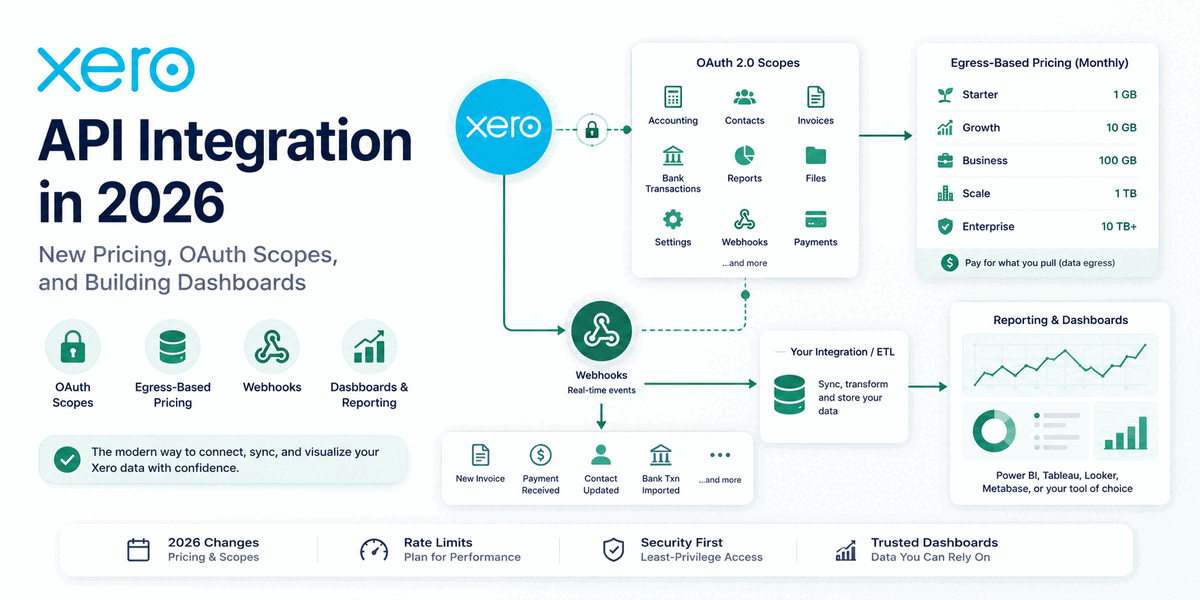
Xero integrations changed materially in March 2026. As of March 2, the API is no longer a free technical dependency: pricing is tiered and metered partly on data egress, and new apps request granular OAuth scopes instead of the two old broad ones. That changes how you design sync jobs, dashboard refreshes, and customer onboarding, and it quietly dates most guides written before late 2025.
Scope: pricing, rate limits, scope names, and migration dates are volatile. The design recommendation does not depend on one exact dollar amount: sync into your own store, pull deltas, keep rate-limit state per tenant, and verify current plan details before quoting or building.
I have built integrations on top of several accounting platforms, and the architectural decisions rhyme from one to the next: authentication, sync strategy, and a reporting layer on top. What is specific to Xero in 2026 is that the sync design now shows up on an invoice: a nightly full re-pull and a delta sync produce the same dashboard at very different monthly costs, and I put numbers on that gap below.
What Changed in the Xero API in 2026
Pricing and OAuth scopes, both effective March 2, 2026.
Xero introduced tiered, usage-based pricing. On December 4, 2025, Xero announced it was retiring its old revenue-share model, and on March 2, 2026 the new model took effect. Instead of free, near-unlimited API access, developers now pay a flat monthly fee across five tiers, and crucially, each tier includes an allowance of data egress, meaning the volume of data your app pulls out of Xero, measured in gigabytes per month. The old model is not grandfathered: existing apps are migrated to the new pricing on a rolling basis from mid-March 2026 onward, each with at least 30 days' notice of its new tier. (The July 1, 2026 date you may see quoted is narrower than "every app": it is the deadline for developers to move customers off Xero App Store Subscription billing, not a blanket cut-off for all apps.) Check your app's migration notice for its specific date.
Xero rebuilt its OAuth permission scopes. For any app created after March 2, 2026, Xero replaced its two broad OAuth 2.0 scopes with a set of granular ones, split by data domain and by read versus write, with more to come as Xero adds product areas. Existing apps have until September 2027 to migrate. Your integration now has to ask for narrower, more specific permissions, which is better for security but means more careful scoping up front and a migration deadline on the calendar for anything already built.
How Much Does the Xero API Cost in 2026?
Xero API pricing now runs across five tiers, from a free Starter tier (up to 5 connections, 1,000 daily calls per org) to a negotiated Enterprise tier. The two cost drivers are the number of connected Xero organizations (tenants) and monthly data egress in gigabytes, and at every paid tier egress overages are billed on top of the flat monthly fee.
Xero quotes these prices in Australian dollars and lists them exclusive of tax; any USD or GBP figure you see is an approximate conversion, not the billed amount. The figures below follow Xero's 2026 pricing FAQ; treat them as examples and recheck Xero's pricing page before quoting a customer.
| Tier | Monthly fee (AUD) | Connections | Included egress | Daily rate limit |
|---|---|---|---|---|
| Starter | A$0 | Up to 5 | n/a | 1,000 calls per org |
| Core | A$35 | Up to 50 | 10 GB per month | 5,000 calls per org |
| Plus | A$245 | Up to 1,000 | 50 GB per month | 5,000 calls per org |
| Advanced | A$1,445 | Up to 10,000 | 250 GB per month | 5,000 calls per org |
| Enterprise | Negotiated | No limit | Negotiated | 5,000 calls per org |
A few things worth pulling out of that table. The Starter tier is free but capped at five connections, which makes it viable for building and testing a proof of concept but not for serving real customers at scale. Every tier from Core upward meters egress and bills overage at A$2.40 per GB on top of the monthly fee; Xero's pricing FAQ says organization endpoints are excluded from the egress allowance. All tiers above Starter share the same per-organization daily rate limit of 5,000 calls, so the differentiator between paid tiers is connection count and how much data you are allowed to pull, not how fast. Note that A$1,445 for Advanced converts to roughly US$895, so a USD-quoted "$895" you find elsewhere is the same tier, not a cheaper one.
What this changes architecturally: dashboards should not read the live API per page view. Pull deltas into your own store with If-Modified-Since and serve every view from that copy. Cache computed views like aging buckets and P&L rollups instead of recomputing them from fresh pulls. Make backfills explicit, deliberately-invoked operations, because a re-pull that a bug can trigger nightly is now a billing event, not just wasted CPU.
A caveat on the numbers above. Xero's developer terms allow usage limits to change, and pricing is a commercial fact rather than an architectural constant. Treat the table as the shape of the pricing (a flat monthly fee plus a metered egress allowance with paid overages), not a quote, and confirm the current figures on Xero's developer pricing page before you size a contract. The shape is the part to design against; the numbers are the part to recheck.
Estimating Egress for a Typical Sync
Estimate egress before you pick a tier: it is the sum, across every endpoint you sync, of (records pulled) times (average JSON payload per record), totaled over a billing month. The numbers below are for one organization with moderate transaction volume; scale them by your tenant count.
Take an org with 5,000 invoices, 800 contacts, and 12,000 bank transactions. Xero paginates most list endpoints at 100 records per page, so the one-time backfill looks like this:
These payload sizes are illustrative, not Xero guarantees. Measure them against your own tenants before sizing a tier.
| Entity | Records | Avg payload | Backfill calls | Backfill egress |
|---|---|---|---|---|
| Invoices | 5,000 | ~3.5 KB | 50 | ~17.5 MB |
| Contacts | 800 | ~2 KB | 8 | ~1.6 MB |
| Bank transactions | 12,000 | ~1.5 KB | 120 | ~18 MB |
| Total | ~178 | ~37 MB |
That backfill is 178 calls, well under the 5,000-per-day ceiling, though you want to pace it under the 60-per-minute limit (spread it over a few minutes, not a tight loop). The one-time egress is about 37 MB.
Steady state is what decides your tier. With a delta sync (If-Modified-Since) and an illustrative 3% daily change rate, you pull roughly 150 invoices, 25 contacts, and 360 bank transactions a day, about 1.1 MB. Over a month that is ~33 MB of egress for the org, a rounding error against Core's 10 GB allowance in the July 2026 pricing table.
Now contrast the naive version: re-pull everything every night. That is the 37 MB backfill repeated 30 times, ~1.1 GB per month for a single org. Ten organizations on that pattern is ~11 GB, which would push the worked example past Core's July 2026 included egress. The same ten orgs on delta sync use ~330 MB. The delta discipline is not politeness toward Xero; in this example it changes the billable data shape by roughly 30x.
What Are the Xero API Rate Limits, Token, and Webhook Limits?
Xero imposes four technical constraints that dictate how any integration has to be built: 30-minute access tokens, layered rate limits, webhooks for only four event types, and a strict webhook delivery contract.
Access tokens expire every 30 minutes. This is short. Any sync that runs longer than half an hour has to refresh its access token mid-process, and if that refresh fails, the connection drops and the customer has to manually re-authorize. Refresh tokens themselves expire after 60 days of inactivity. Token management is one of the easiest ways to create "the integration stopped working" tickets, especially when refresh tokens rotate and two jobs try to refresh the same connection at once. The fix is proactive refresh on a schedule, and the Rails implementation below is built around exactly that.
Rate limits are strict and layered. Xero enforces several limits at once, and crossing any one of them returns a 429 Too Many Requests:
| Limit | Ceiling | Scope | Notes |
|---|---|---|---|
| Concurrent calls | 5 | Per org, per app | Simultaneous in-flight requests |
| Calls per minute | 60 | Per org, per app | The one that trips teams up most often |
| Calls per day | 5,000 (1,000 on Starter) | Per org, per app | Resets at midnight UTC |
| App-wide per minute | 10,000 | All orgs, per app | Ceiling across every connected tenant |
Every response carries headers with the remaining budget against each limit: X-DayLimit-Remaining, X-MinLimit-Remaining, and X-AppMinLimit-Remaining. Read them and back off before the 429, not after. If you do hit a 429, Xero returns Retry-After; respect that value instead of guessing a sleep duration. In practice the per-minute limit bites before the daily cap does, especially during a backfill.
Failure mode to avoid
Do not run a global backfill worker that drains all tenants through one queue. Xero's useful limits are tenant-scoped, so one large tenant backfill should slow that tenant down, not every connected organization. Store rate-limit state per tenant and make the scheduler pick work based on each tenant's remaining budget.
Webhooks exist, but only for a few events. Xero supports webhooks so your system can react the moment something changes, but only for a limited set: contacts, invoices, credit notes, and subscriptions, each on create and update. There is no webhook for bank transactions, payments, journal entries, accounts, or tax rates. For everything not covered, you fall back to polling with the If-Modified-Since header to pull only what changed, so any Xero integration ends up split: event-driven for those four entities, poll-based for the rest.
Webhook delivery has a tight contract. If you use Xero webhooks, your endpoint must validate every incoming request using an HMAC-SHA256 signature (Xero sends a signature header you check against your signing key), respond within 5 seconds over HTTPS, and pass an initial "Intent to Receive" validation before Xero will send real events. Miss the signature check or the 5-second window and deliveries fail. If they keep failing, Xero retries with decreasing frequency for 24 hours, then disables the webhook until you manually re-enable it. Events that occur while it is down are saved for up to 31 days and replayed once it is healthy again.
Migrating to Xero's Granular OAuth Scopes
The second 2026 change is quieter than pricing but has a deadline attached, so it belongs on the same planning page. Xero replaced its two broad accounting scopes with a set of granular ones, and any app created after March 2, 2026 must request the narrow scopes from day one. Existing apps have until September 2027 to migrate before the old broad scopes stop working.
The pattern is the part to internalize, because the exact scope list will keep growing as Xero adds product areas. Instead of one scope that grants everything, you now request permission per data domain (invoices, payments, bank transactions, contacts, settings, reports, journals, attachments) and, within most domains, separately for read versus write. A dashboard that only reads invoices and contacts asks for the read scopes on those two domains and nothing else. That is the whole point of the change: least privilege, so a leaked token for a read-only reporting app cannot be used to write into the ledger.
A few things catch teams during the migration. The big one is offline_access: it is mandatory if you want a refresh token. Without it, Xero hands you a 30-minute access token and no way to renew it, so the connection dies half an hour after the user authorizes and never comes back. This is the most common "it worked in testing, then broke overnight" symptom, and the fix is one word in the scope list.
Changing scopes also forces re-consent. When you add or narrow the scopes an existing app requests, connected users have to re-authorize so they can approve (or be shown) the new permission set. There is no silent server-side upgrade, so plan a re-auth flow and a prompt that walks existing customers through reconnecting, rather than discovering on the deadline that every tenant needs to click through a consent screen again. A missing permission shows up as an authorization failure with an insufficient-scope challenge, so handle that case as a reconnect prompt instead of a generic sync failure.
Beyond that, ask only for what you use. A narrower scope list means a shorter, less alarming consent screen, which helps connection completion rates, and it shrinks the blast radius if a token leaks. Resist requesting write scopes "just in case" for a reporting integration that never writes.
If you maintain integrations against more than one accounting platform, this is a familiar rhythm rather than a Xero quirk. The Odoo API overhaul landed its own 2026 changes; the durable skill is designing the OAuth layer so a scope or endpoint change is a config edit and a re-consent prompt, not a rewrite.
The precise scope names and migration mechanics are Xero's to change; the developer documentation is the authority over any guide, including this one. Confirm the current scope list and migration steps against Xero's docs before you wire them in. The design guidance (least privilege, offline_access for refresh, plan for re-consent) is stable; the specific strings are not. If synced Xero data later feeds AI tooling, review Xero's developer terms separately because they may restrict training, fine-tuning, adaptation, or model enhancement with API data.
Token Management in Rails
Access tokens die after 30 minutes, the refresh token rotates on every use, and a refresh token that goes 60 days without use is dead. Wait for a 401 and you have already lost the race; refresh ahead of expiry, on a schedule, and hand every sync a token with plenty of life left.
Here is the shape I use in Rails 8: store the credentials encrypted at rest with Active Record Encryption, refresh on a skew, and pre-warm with a recurring Solid Queue job.
The encrypted connection model
encrypts (Rails 7 and 8) encrypts the token columns transparently, so a leaked database dump does not hand someone live Xero credentials. The columns stay ordinary strings in the schema.
# app/models/xero_connection.rb
class XeroConnection < ApplicationRecord
  class RefreshError < StandardError; end

  # Active Record Encryption: encrypts on write, decrypts on read. Configure a
  # key with `bin/rails db:encryption:init` and store it in credentials.
  encrypts :access_token
  encrypts :refresh_token

  TOKEN_URL = "https://identity.xero.com/connect/token".freeze

  # Refresh once the token has less than this much life left. Keep this window
  # wider than the refresh job's interval (below) so no token slips through.
  REFRESH_SKEW = 10.minutes

  def access_token_expiring?
    expires_at.nil? || expires_at <= REFRESH_SKEW.from_now
  end
end
Refreshing before expiry, exactly once
The subtlety is concurrency. Xero rotates the refresh token on every call, so if two jobs refresh at the same time they each spend a single-use token and one of them invalidates the connection. with_lock serializes them on a row lock, and the re-check inside the lock means the loser does nothing instead of double-refreshing.
# app/models/xero_connection.rb (continued)
  def refresh_if_expiring!
    return self unless access_token_expiring?

    with_lock do
      reload
      perform_refresh! if access_token_expiring?
    end
    self
  end

  private

  def perform_refresh!
    response = Faraday.post(TOKEN_URL) do |req|
      req.headers["Authorization"] = "Basic #{client_credentials}"
      req.headers["Content-Type"]  = "application/x-www-form-urlencoded"
      req.body = URI.encode_www_form(
        grant_type:    "refresh_token",
        refresh_token: refresh_token
      )
    end

    unless response.success?
      raise RefreshError, "Xero token refresh failed (#{response.status}): #{response.body}"
    end

    payload = JSON.parse(response.body)
    update!(
      access_token:  payload.fetch("access_token"),
      refresh_token: payload.fetch("refresh_token"), # rotated every refresh - must persist
      expires_at:    payload.fetch("expires_in").to_i.seconds.from_now
    )
  end

  def client_credentials
    config = Rails.application.credentials.xero
    Base64.strict_encode64("#{config[:client_id]}:#{config[:client_secret]}")
  end
Every sync then opens with a one-line guard before its first API call, and the row lock makes it safe even if the pre-warm job fires at the same moment:
connection = XeroConnection.find(connection_id)
connection.refresh_if_expiring!
access_token = connection.access_token
Pre-warming tokens with Solid Queue
The guard above protects a sync, but you do not want a long-idle connection to discover its token is stale only when a user opens a dashboard. A recurring Solid Queue job sweeps every connection and refreshes the ones inside the window. It is idempotent: refresh_if_expiring! is a no-op for tokens with plenty of life left, so running it often is cheap.
# app/jobs/xero_token_refresh_job.rb
class XeroTokenRefreshJob < ApplicationJob
  queue_as :default

  def perform
    XeroConnection.find_each do |connection|
      connection.refresh_if_expiring!
    rescue XeroConnection::RefreshError => e
      Rails.logger.warn("[xero] refresh failed for connection ##{connection.id}: #{e.message}")
      # A refresh token rejected with 400 is past its 60-day idle window and is
      # gone for good - flag for re-auth instead of retrying forever.
      connection.update!(needs_reauth: true) if e.message.include?("(400)")
    end
  end
end
# config/recurring.yml - Solid Queue's recurring scheduler
production:
  xero_token_prewarm:
    class: XeroTokenRefreshJob
    queue: default
    schedule: every 5 minutes
The intervals are deliberate. Tokens live 30 minutes, the skew is 10 minutes, and the job runs every 5. Because the refresh window (10 minutes) is wider than the job's interval (5 minutes), at least one run always lands inside the window, so every token is refreshed with 10 to 20 minutes still on the clock. No sync ever has to refresh on the critical path, and a connection only ends up in the needs_reauth state if its refresh token genuinely lapsed.
xero-ruby SDK or Raw HTTP?
Xero ships an official SDK, xero-ruby, that wraps OAuth, token refresh, and typed models for every endpoint. The examples above call the API directly with Faraday. Both are valid; the choice comes down to how much of the API surface you touch and how tightly you need to control egress.
| Concern | xero-ruby SDK | Raw HTTP (Faraday / Net::HTTP) |
|---|---|---|
| OAuth + token refresh | Built in (token-set storage + refresh helpers) | You write it (the model above) |
| Endpoint coverage | Generated models for the whole API | Only what you implement |
| Response shape | Typed Ruby objects | Raw JSON you map yourself |
| Egress control | Hydrates full objects per the spec | Request only the pages and fields you need |
| Dependency weight | Large generated gem | Thin, one HTTP client |
| New endpoints | Lags the spec until regenerated | Available immediately |
Reach for the SDK when you touch many endpoints and want typed models without hand-mapping JSON; its token handling alone removes a class of bugs. Go raw HTTP when the integration hits a handful of endpoints and egress is the constraint, because you control exactly what you request and parse instead of materializing full objects the SDK hydrates for you. A common middle path: use the SDK's OAuth and token plumbing, then drop to raw requests for the high-volume read endpoints where egress is the line item that matters.
What Reporting Limitations Does the Xero API Have?
The Xero API has five reporting limitations that consistently surprise teams building dashboards: customers and suppliers share one model with no API-level filter, aged-receivables endpoints return one contact at a time, the standard Accounting API reports have no cash flow statement endpoint (the separate Finance API does, behind gated access), tracking-category breakdowns are inconsistent, and record updates require sending the whole object.
Customers and suppliers live in one table. Xero does not separate customers and suppliers. They share a single Contacts model, distinguished only by isCustomer and isSupplier flags, and a single contact can be both. There is also no way to filter invoices to just customers at the API level, so a common pattern is to pull the list of customer contacts first, then filter invoices against that list in your own code. Get this wrong and your "customer revenue" report silently includes supplier transactions.
Aged receivables and payables come one contact at a time. If you want an aged AR or AP report (the breakdown of who owes you what, and how overdue it is), Xero's API does not let you pull it for all contacts in one call. The dedicated aged-report endpoints return data for a single contact at a time. For a business with hundreds of customers, naively building an aging dashboard means hundreds of API calls, which collides directly with the rate limits and the new egress meter. The practical workaround is to reconstruct aging yourself from invoice due dates and payment records, which is far more call-efficient but is real work to get right.
The standard reports have no cash flow statement endpoint. The Xero Accounting API's report set does not expose a cash flow statement the way the web UI presents one. Xero's separate Finance API does have a cash flow statement endpoint, but access to that API is gated behind Xero approval, and the cash flow statement itself is not available in the US region, so for many apps the practical answer is still to derive cash flow from bank transactions and journal data. Confirm whether your app has Finance API access before you decide to reconstruct it.
Reports do not always break down by tracking category. Xero uses tracking categories (department, project, location) to segment financial data, but several report endpoints, including the trial balance, have historically had limited or inconsistent support for returning data split by those categories. If your reporting depends on per-department or per-project breakdowns, validate that the specific report endpoint you need actually returns them before you promise it to anyone.
You must send the whole object on updates. When you update a record in Xero, you generally send the complete object, and you use Xero's own record IDs (GUIDs) rather than creating duplicates. This is the same class of gotcha that affects most accounting APIs: partial updates are not the norm, so your integration has to fetch, modify, and resend the full record, which is another source of avoidable egress if you are not careful.
When You Should Use the Xero API Directly, and When You Should Not
Not every Xero integration justifies building and maintaining the full stack yourself.
| Your situation | Recommended approach | Why |
|---|---|---|
| One-off data export or migration | Direct API calls, no persistence | Building sync infrastructure for a batch job is over-engineering |
| Connecting Xero to one or two common SaaS tools | Off-the-shelf connector or iPaaS | Faster and cheaper than custom code, if a connector exists |
| Connecting Xero plus several other accounting platforms | Unified API or custom middleware | One integration surface instead of many; normalizes the differences |
| Custom dashboard or analytics on Xero data | Sync to a warehouse, then build BI | Fast local queries, controlled egress, survives API changes |
| Deep, product-core Xero integration | Custom build with careful token and egress design | Full control where the integration is central to your product |
How to Build a Finance Dashboard on Xero Data
The most common Xero integration request I see is some version of: "We want a live dashboard of our financial position, pulling from Xero, ideally combined with our other systems." The work is less about the charting tool than deciding which accounting numbers you can cache, which ones need a fresh pull, and how often Xero should be touched under the 2026 pricing model.
-
Pick the handful of numbers leadership actually watches. A strong finance dashboard answers one question: how healthy is the business this month? A typical set is revenue and gross margin, cash position, aged receivables (who owes you and how overdue), aged payables (what you owe), and a short runway or burn figure. Each gets a current value, a trend, and one drill-down. Resist the urge to rebuild all of Xero.
-
Map each number to its Xero source, and flag the gotchas early. Revenue and margin come from invoices and the profit-and-loss report. Cash comes from bank summary data. Receivables and payables come from the aged-report endpoints (remember: one contact at a time, so plan to reconstruct these from invoices instead). A cash flow figure usually has to be derived, because the standard Accounting API reports have no cash flow endpoint (the separate Finance API does, if your app is approved for it). Name these constraints in the first planning meeting.
-
Sync to a warehouse, do not query Xero live. Pull data from Xero on a controlled schedule into a small data warehouse, and have the dashboard read from the warehouse, never from Xero directly. Use the
If-Modified-Sinceheader so each sync pulls only what changed since the last run, and a Xero outage does not take your dashboard down. If you are storing periodic financial snapshots, a time-series store like TimescaleDB fits the shape of that data well. -
React to changes with webhooks where they exist. For contacts and invoices, use Xero's webhooks to trigger a targeted sync the moment something changes, rather than polling on a timer. For everything webhooks do not cover, fall back to a scheduled delta sync, a recurring background job that Solid Queue handles well in Rails.
-
Pick the visualization layer last. Pick the BI tool last. The important decision is not Power BI versus Tableau; it is whether the dashboard reads from your warehouse instead of the live Xero API.
-
Set governance and refresh expectations up front. Decide who sees what, and how fresh the numbers need to be. Finance dashboards rarely need real-time data; an hourly or daily refresh is usually plenty, and it keeps egress low. Be honest about the sync delay rather than implying the numbers are live to the second.
When Should You Build Reporting Outside Xero?
Build reporting outside Xero when Xero is no longer the only system in the question. Its own reports are good for a single entity watching its own numbers; they start to strain when you need consolidation, cross-system blending, or frequent re-pulls that turn into egress cost.
| When you hit this | Stop doing this | Start doing this |
|---|---|---|
| You need to combine Xero with other systems | Living inside Xero's reports | Sync to a warehouse and blend the data |
| Egress costs are climbing | Querying the live API for every view | Cache and warehouse, sync deltas only |
| You manage several Xero organizations | Logging into each one separately | Consolidate tenants into one reporting layer |
What I Would Build
For a multi-tenant Rails app syncing Xero, my default is rate-limit buckets scoped per tenant, because the 60-per-minute and 5,000-per-day ceilings apply per organization per app. A global throttle wastes budget: one tenant's backfill should slow that tenant down, not stall every other tenant's sync. Track the remaining budget from the rate-limit headers Xero returns rather than counting requests blind.
On top of that: webhooks trigger a targeted delta sync for invoices and contacts the moment they change; a recurring Solid Queue job polls everything webhooks do not cover (bank transactions, payments, journals) with If-Modified-Since; and every synced record lands in a warehouse or read-model table that dashboards query. Xero gets touched by exactly two code paths, the webhook handler and the poller, which keeps egress predictable and makes a 429 traceable to one tenant and one job. Backfill stays a separate, explicitly-invoked job, never something the poller falls back to when it loses its cursor.
What I Would Not Build
I would not build a dashboard that calls Xero on every page load. I would not let the poller fall back to a full backfill when it loses its cursor. I would not treat all tenants as one shared rate-limit bucket. And I would not request write scopes for a reporting-only product just because they might be useful later.
Illustrative Scenario: Consolidating Three Xero Organizations
Picture a mid-sized professional-services firm running three legal entities, each in its own Xero organization, with around 90 staff across two countries. The firm here is a composite I put together for illustration, not a real client, but I have seen this exact shape more than once.
The problem. Every month the finance lead logged into three separate Xero organizations, exported profit-and-loss and aged-receivables reports from each, and stitched them together in a spreadsheet to produce a consolidated view for the partners. It took two full days, the numbers were a month stale by the time anyone saw them, and consolidating across three entities by hand was error-prone. The partners wanted one consolidated dashboard, refreshed weekly.
The approach. A three-phase project. First, scope the egress and pick the right Xero tier, since pulling three organizations' worth of data monthly has a real cost under the new model, and design the sync to pull only what changed. Second, build the integration: a scheduled delta sync using the If-Modified-Since header for each organization, webhooks for invoice and contact changes, and aged receivables reconstructed from invoice data rather than the one-contact-at-a-time endpoint, all landing in a small managed warehouse with a clean consolidated data model. Third, deploy a single dashboard reading from the warehouse, showing consolidated and per-entity views with a weekly refresh.
The realistic outcome. For projects of this shape, the two-day monthly spreadsheet cycle goes away, the numbers move from month-stale to current-week, and a consolidated cross-entity view exists where none did. The delta-sync discipline designed in up front keeps the ongoing Xero API bill predictable. How much of that lands depends on how clean the three organizations' data is at the start; entity mapping and intercompany eliminations are where these projects actually spend their time.
Before You Write Any Code
If you are scoping a Xero integration in 2026, the short list is this. Estimate your data egress before anything else, because it now drives both your tier and your monthly cost. Design every sync to pull only what changed, using the If-Modified-Since header, since that single discipline controls rate limits and cost at once. Build token refresh proactively, because the 30-minute expiry is the most common point of failure. And if you have an existing Xero app, put the OAuth scope migration on the calendar now, ahead of the September 2027 deadline.
In a Xero project the code is the predictable half. What needs settling early is which numbers finance will trust, how stale they are allowed to be, and how to pull them without running the egress meter hot. Those answers decide the sync architecture, and the sync architecture decides the dashboard - not the other way round.
Sources and Related Reading
- Odoo API Integration in 2026: JSON-2, Webhooks, Dashboards - the ERP counterpart, with its own 2026 API overhaul
- TimescaleDB vs Postgres in Rails: When You Need It - time-series storage for financial snapshot data
- Rails PostgreSQL Performance: Start With the Query Plan - indexing strategies for warehouse and snapshot tables
- Solid Queue in Rails 8: Setup Notes and Trade-offs - scheduling the delta-sync jobs behind an integration
- Xero Accounting API Reference - the canonical endpoint reference for contacts, invoices, and reports
- Xero API Rate Limits - the official concurrent, per-minute, and daily call ceilings
- Xero OAuth 2.0 Scopes - the granular permission scopes an app requests after the March 2026 change
- Xero Webhooks Overview - the signature validation and delivery contract for event-driven syncs