Gemini API in Ruby: Interactions Client Notes
Build a narrow Gemini Interactions API client in Ruby: Faraday transport, function calling, boundary parsing, server-side state, and approval gates.
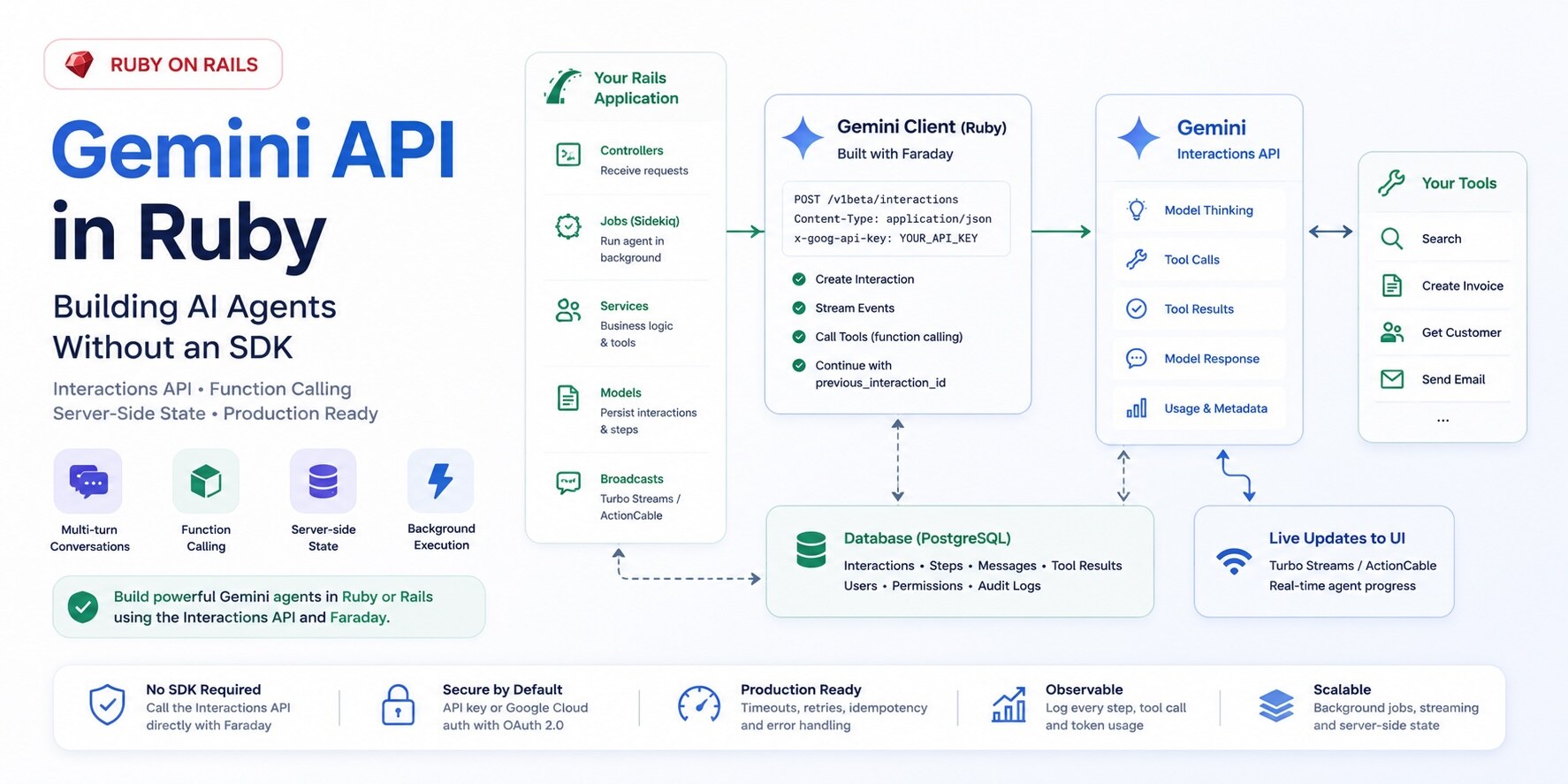
I wanted the smallest Gemini agent I would be willing to put inside a Rails app. Not a chatbot demo, but the shape I would keep after the first week: one client, one parser, a tool registry, stored interaction IDs, and enough database state to understand what happened after the request is gone.
For this kind of Gemini feature, the useful primitive is the Interactions API. A plain content generation call gives you a response. An interaction gives you the whole turn: user input, model output, tool calls, tool results, usage metadata, and an ID you can pass into the next request. That ID is the difference between "append everything to a giant transcript forever" and "continue from the interaction Gemini already stored."
Scope: this post is about the client boundary I would write in Ruby when the app needs interaction state and tool execution. Google's Gemini API Libraries page and Interactions API overview are the source of truth for SDK support and endpoint behavior. The docs say Interactions is generally available, recommend it for new projects, document previous_interaction_id, background=true, and store=false, and do not list Ruby among the official GenAI SDK packages. Gemini endpoint paths, model IDs, retention, and Enterprise Agent Platform details remain version-sensitive; verify them before shipping. The Rails shape here is the stable part: a narrow client boundary and durable run and step records.
The Ruby part is simple and slightly annoying: Google's official Gemini libraries page does not list a Ruby GenAI SDK, so you call the REST API yourself. That is not a blocker. It does mean the request shape, response parsing, streaming behavior, and error handling become your code instead of a package's code. If you are building against the Anthropic API instead, the architecture is similar but the client boundary differs, which I covered in Rails AI Agents with the Anthropic SDK.
| Feature | generateContent API | Interactions API |
|---|---|---|
| Primary use | Standalone text generation | Multi-turn agentic workflows |
| Server-side state | No | Yes (interaction IDs) |
| Background execution | No | Yes (background: true) |
| Observable execution steps | No | Yes (step log in response) |
| Multi-turn without full resend | No | Yes (previous_interaction_id) |
| Fit for this post | One-off calls | Agent-shaped state and tool loops |
Why I would start with Interactions
For a Gemini agent, I would start with the Interactions API rather than generateContent. generateContent still works, but it is shaped like a one-off completion. An agent is a loop: take input, decide whether a tool is needed, let Rails run that tool, send the result back, and continue until the model stops asking for more work.
Your Rails app has its own loop around that: stream progress to the user, persist state for the next turn, hand slow runs to a background job, and keep enough step data to explain why the agent called lookup_customer_invoices before it answered.
The Interactions API gives you that as a resource. The interaction carries its steps in order: user input, model thoughts, function calls, function results, and final output. That is much better than trying to infer intent from a flat completion response. If the model asked for a tool, you read a function_call step. You do not scrape text or guess from a finish reason.
The Ruby SDK gap
Ruby is not on Google's official SDK list. That leaves a Rails app three realistic options: use a community Gemini gem, reach for a multi-provider abstraction, or call the REST API directly.
The gems are fine for plain model calls. They will get you to a working demo quickly. I would call REST directly once I care about the exact boundary: the request payload, the parser, retries, logs, streaming callbacks, and the place where tool execution actually happens.
The cost is that the SDK-shaped work becomes yours. In Ruby that usually means a small Faraday client and an adapter that turns your app's internal agent objects into Gemini interaction requests. That is not a huge amount of code. The important part is keeping it narrow enough that when Gemini changes a field, you fix one parser instead of grepping jobs, controllers, and views.
Two Interaction Surfaces
There are two surfaces, and the difference is operational, not cosmetic. The Gemini Developer API uses an API key. That is the path I would use to get a Rails agent working from a console. The Enterprise Agent Platform runs through Google Cloud, uses IAM, and brings in projects, locations, billing, and platform controls.
The Gemini Developer API exposes interactions at:
POST https://generativelanguage.googleapis.com/v1beta/interactions
No token to mint, no project path to assemble, just the key in a header and you are making calls. The Enterprise path gives up that simplicity.
Gemini Enterprise Agent Platform exposes the same capability through Google Cloud, on a project- and location-scoped path on aiplatform.googleapis.com instead of the flat Developer API path. This one has moved around as the platform evolved, so treat the path below as a placeholder and confirm the current one against the Enterprise Agent Platform reference before you wire it in:
# Placeholder shape - verify against the current Enterprise Agent Platform reference.
# The current reference uses locations/global; only {project} is yours to fill in.
POST https://aiplatform.googleapis.com/v1beta1/projects/{project}/locations/global/interactions
That is the Google Cloud version: Google Cloud authentication, project and location in the path, and a different set of people likely involved in approving it. The request bodies can look similar, but the app should not let that distinction leak everywhere. Decide once when you build the client, then keep the rest of the code on one interface.
class GeminiInteractionsClient
  def initialize(api_key: nil, project: nil, location: "global", authorizer: nil)
    @api_key = api_key
    @project = project
    @location = location
    @authorizer = authorizer
  end

  def developer_api?
    @api_key.present?
  end

  def base_url
    developer_api? ? "https://generativelanguage.googleapis.com" : "https://aiplatform.googleapis.com"
  end

  def interactions_path
    if developer_api?
      "/v1beta/interactions"
    else
      "/v1beta1/projects/#{@project}/locations/#{@location}/interactions"
    end
  end
end
The developer_api? switch carries that decision. Everything downstream calls create_interaction and does not care which auth path you chose. The sharp edge is the Enterprise path itself. The Developer API examples below follow the documented Interactions shape available when this post was last checked; treat the Enterprise path as something to fill in from the current Google Cloud reference before shipping.
A Small Faraday Client
A minimal client is mostly careful HTTP. I want JSON in, parsed JSON out, explicit timeouts, and failed HTTP calls to raise before they masquerade as model output.
class GeminiInteractionsClient
  def create_interaction(payload)
    response = connection.post(interactions_path) do |request|
      request.headers.update(auth_headers)
      request.params.update(query_params)
      request.body = payload
    end

    response.body
  end

  private

  def connection
    @connection ||= Faraday.new(url: base_url) do |faraday|
      faraday.request :json
      faraday.response :json
      faraday.response :raise_error

      faraday.options.open_timeout = 5
      faraday.options.timeout = 60

      faraday.adapter Faraday.default_adapter
    end
  end

  def query_params
    {}
  end

  def auth_headers
    return { "x-goog-api-key" => @api_key } if developer_api?

    headers = {}
    @authorizer.apply!(headers)
    headers
  end
end
The line that earns its keep has nothing to do with Gemini:
faraday.response :raise_error
Leave it out and Faraday can hand you a failed HTTP response as if it were a normal body. Inside an agent loop that turns into a confusing symptom: a blank assistant message, a parser failure, or a tool loop that looks like the model got confused. The real bug may be a 401 from an expired key. Make the transport failure obvious.
Creating an Interaction
A minimal Gemini interaction needs a model name and an input. Model IDs change, so the examples below read the model from configuration instead of freezing a name into the code. The smallest payload is intentionally dull. System instructions, tools, and generation config layer on top.
payload = {
  model: ENV.fetch("GEMINI_MODEL"),
  input: "Explain the difference between optimistic and pessimistic locking in Rails."
}

client.create_interaction(payload)
For an agent, you normally add a system instruction and tools.
payload = {
  model: ENV.fetch("GEMINI_MODEL"),
  system_instruction: "You are a careful assistant inside a Rails application. Use tools when you need application data. Do not guess internal records.",
  input: "Which invoices are overdue for customer 123?",
  tools: [
    {
      type: "function",
      name: "lookup_customer_invoices",
      description: "Look up invoices for one known customer. Use this when the user asks about that customer's invoices, payment status, or overdue balance.",
      parameters: {
        type: "object",
        properties: {
          customer_id: {
            type: "integer",
            description: "The internal customer ID. Do not guess this value."
          },
          status: {
            type: "string",
            enum: ["draft", "open", "paid", "overdue"],
            description: "Optional invoice status filter."
          }
        },
        required: ["customer_id"]
      }
    }
  ]
}
The tool declaration is the interface the model reads. Function names, descriptions, parameter names, enum values, and required fields all change how the model decides what to call. If customer_id is required and unsafe to guess, say that in the parameter description, not only in your prompt.
The Tool Interface Is the Real Prompt
The temptation is to point a tool straight at a controller action or service object you already have and call it done. I would not do that. A human using your existing UI can recover from a vague label or a bad guess. The model mostly has the tool name, description, parameters, and whatever context you gave it. The tool interface has to make the next move obvious.
A tool the model can actually use well answers a few questions up front:
- When should this tool be used?
- When should it not be used?
- What identifiers are safe to pass?
- What should the model do if the identifier is missing?
- What does the result mean?
- Is this a read, preview, write, or destructive action?
- Does the action require user confirmation?
For example, this tool is too vague:
{
  type: "function",
  name: "lookup",
  description: "Looks things up.",
  parameters: {
    type: "object",
    properties: {
      id: { type: "integer" }
    }
  }
}
This is better:
{
  type: "function",
  name: "lookup_customer_invoices",
  description: "Look up invoices for one known customer. Use this only after the customer has been resolved to an internal customer_id. This tool does not search customers by name and does not create or update invoices.",
  parameters: {
    type: "object",
    properties: {
      customer_id: {
        type: "integer",
        description: "The internal customer ID. Do not guess this. Resolve the customer first if needed."
      },
      status: {
        type: "string",
        enum: ["draft", "open", "paid", "overdue"],
        description: "Optional invoice status filter."
      },
      limit: {
        type: "integer",
        description: "Maximum number of invoices to return. Defaults to 20."
      }
    },
    required: ["customer_id"]
  }
}
What makes the second version better is the decision boundary, not the length: call this only after the customer has been resolved, do not use it for customer search, do not create or update invoices, and do not guess the ID. That is the difference between a tool the model can use and one it guesses at.
Reading Execution Steps
The response is step-oriented, so parse it that way. If you grab the final text and move on, you drop the useful parts: model thoughts, function calls, function results, and usage metadata. Normalize those steps at the provider boundary instead of letting raw Gemini JSON flow into jobs and views:
module Agent
  Step = Data.define(:id, :type, :name, :arguments, :content, :raw)

  FunctionCall = Data.define(:id, :name, :arguments, :raw)
  ModelOutput = Data.define(:text, :raw)
end
Then the rest of your Rails app deals with your objects, not Google's response shape. That boundary matters. If raw provider JSON spreads through jobs, controllers, views, and service objects, a response-field rename becomes an application-wide refactor. Keep the provider shape at the edge. Keep the function_call id too, because the result has to reference the call it answers.
The Agent Loop
The loop is small enough to hold in your head: create an interaction, read the steps, run approved tools, hand the results back, and repeat until the model stops asking for tools. What takes longer is making each iteration bounded, authorized, persisted, and understandable later.
class AgentRunner
  MAX_STEPS = 8

  def initialize(client:, tool_registry:)
    @client = client
    @tool_registry = tool_registry
  end

  def run(input:, previous_interaction_id: nil)
    interaction_id = previous_interaction_id
    final_output = nil

    MAX_STEPS.times do
      response = @client.create_interaction(
        build_payload(input: input, previous_interaction_id: interaction_id)
      )

      interaction_id = response["id"]

      steps = parse_steps(response)
      function_calls = steps.select { |step| step.type == "function_call" }

      if function_calls.empty?
        final_output = extract_model_output(steps)
        break
      end

      tool_results = function_calls.map do |call|
        execute_tool(call)
      end

      input = tool_results_to_input(tool_results)
    end

    {
      interaction_id: interaction_id,
      output: final_output
    }
  end
end
Real code adds stricter parsing, error handling, streaming, and logs, but the skeleton stays the same: create, read steps, run tools, continue. The tool_results_to_input helper builds the continuation payload. A function result is a function_result step whose call_id matches the id of the function_call it answers:
def tool_results_to_input(tool_results)
  tool_results.map do |call_id:, name:, output:|
    {
      type: "function_result",
      call_id: call_id,
      name: name,
      result: [{ type: "text", text: output.to_json }]
    }
  end
end
That array becomes the next request's input. This is why you keep the function_call id: on a turn with more than one tool call, it is what connects each result to the request it answers.
Server-Side State with previous_interaction_id
Pass an ID instead of a transcript. When an interaction completes, the API returns an ID. On the next turn you pass it as previous_interaction_id, and Gemini retrieves the history from the prior interaction rather than waiting for Rails to resend the whole conversation.
payload = {
  model: ENV.fetch("GEMINI_MODEL"),
  previous_interaction_id: previous_interaction_id,
  input: "Now summarize that in three bullet points.",
  system_instruction: system_instruction,
  tools: tool_declarations
}
This changes what your app has to store and resend. Without server-side state, Rails rebuilds the full model conversation: user messages, model messages, tool calls, tool results, and some compaction strategy once the context gets large. With previous_interaction_id, you keep the ID and send the new turn. In a customer-support workflow, that is the difference between resending a growing transcript on every reply and sending the latest message plus the previous interaction ID.
One detail is easy to miss: history carries over, but interaction-scoped settings do not. Tools, system instructions, temperature, thinking level - none of those ride along automatically just because you passed an interaction ID. Resend them on every request, and keep that configuration in one durable place:
class AgentConfig
  def system_instruction
    "You are a careful assistant inside a Rails application..."
  end

  def tool_declarations
    ToolRegistry.declarations
  end

  def generation_config
    {
      temperature: 0.2,
      thinking_level: "medium"
    }
  end
end
Then feed that same config into every interaction, whether it is the first turn or a continuation.
store=false vs Server-Side State
Storing conversation data on Google's servers is a product and privacy decision before it is a technical one. By default the Interactions API stores interaction objects, and that is what makes previous_interaction_id, background execution, and step-level observability possible. If the workflow should not store interaction data, send:
{
  store: false
}
The trade-off is direct. If you disable storage, you cannot use stored-state features such as previous_interaction_id, and it is incompatible with background execution. The mistake is treating store: true as an implementation detail and only discussing retention after the feature already handles customer data.
How that shakes out in practice: a throwaway prototype stores everything and nobody cares. A normal chat assistant can store too, as long as you actually understand the retention window. A workflow touching sensitive data gets store: false, full stop. A background research task has no choice, storage is on. And a regulated system should pick a mode and write down why, because an auditor will eventually ask. Make it a deliberate setting per workflow, not a client default nobody revisits.
Background Execution
Use background: true with store: true for long Gemini interactions. A multi-tool run can outlive the web request, and it should not hold a Puma worker while the model calls tools. The controller creates an AgentRun, returns immediately, and a job manages the interaction lifecycle, persists steps, and notifies the UI.
The Interactions API supports background execution with:
{
  background: true,
  store: true
}
An ApplicationJob is the natural wrapper. It gives you a place for retries, error recording, queue selection, and status updates without inventing a separate agent runtime:
class AgentRunJob < ApplicationJob
  queue_as :default

  def perform(agent_run_id)
    agent_run = AgentRun.find(agent_run_id)

    result = AgentRunner.new(
      client: GeminiInteractionsClient.build,
      tool_registry: ToolRegistry.new(agent_run.user)
    ).run(
      input: agent_run.input,
      previous_interaction_id: agent_run.previous_interaction_id
    )

    agent_run.update!(
      output: result[:output],
      previous_interaction_id: result[:interaction_id],
      status: "completed"
    )
  rescue => error
    agent_run.update!(
      status: "failed",
      error_class: error.class.name,
      error_message: error.message
    )

    raise
  end
end
The provider should not dictate the rest of the Rails app. Treat the interaction as an external workflow and wrap it in normal application primitives: jobs, records, logs, retries, and authorization. For queue setup and concurrency tuning that affects agent throughput, see the practical Solid Queue guide.
Streaming Events to the UI
Streaming matters when a user is watching the run. A ten-second tool loop with a dead spinner feels broken even if the job is fine. The Interactions API streams events, so in Ruby you parse a streaming HTTP response and turn each provider event into another update on the AgentRun.
On the Developer API, streaming needs ?alt=sse on the request URL together with stream: true in the body. Set only stream: true and Gemini answers with a single JSON object, and your on_data parser waits for events that never arrive in the shape it expects. Add the query flag on the streaming path only, since the non-streaming create_interaction should stay a plain JSON POST.
The Faraday adapter matters more than usual here. I have seen streaming work in rails console and then buffer under Puma, flushing nothing until the run finished, because the adapter's on_data callback behaved differently in the app server. net_http can work, but verify callbacks in the runtime you actually deploy. The parser shape is:
def stream_interaction(payload)
  buffer = +""

  connection.post(interactions_path) do |request|
    request.headers.update(auth_headers)
    request.params.update(query_params.merge(alt: "sse"))
    request.body = payload.merge(stream: true)

    request.options.on_data = lambda do |chunk, _bytes|
      buffer << chunk

      while (line_end = buffer.index("\n"))
        line = buffer.slice!(0..line_end).strip
        handle_stream_line(line)
      end
    end
  end

  handle_stream_line(buffer.strip) if buffer.present?
end

def handle_stream_line(line)
  return if line.blank?
  return unless line.start_with?("data:")

  payload = line.delete_prefix("data:").strip
  return if payload.empty?

  event = JSON.parse(payload)
  handle_interaction_event(event)
rescue JSON::ParserError
  # Keepalive or non-JSON sentinel line. Ignore it and wait for the next event.
end
A parser I would trust in an app needs a few boring defenses. Ignore empty keepalive lines, and do not assume every line is JSON. Flush the final buffer after the stream closes, and reset buffers between retries so a reconnect does not inherit half a line from the last attempt. Persist enough event data to debug a broken run later, and do not report success until you have actually seen a terminal event.
The UI should not know what a Gemini event looks like. Convert provider events into product events:
agent.startedagent.thinkingagent.tool_call.startedagent.tool_call.completedagent.output.deltaagent.completedagent.failed
That keeps the frontend stable if the provider event shape changes.
Function Calls and Tool Results
When Gemini emits a function call, your app decides whether to run it. "The model asked for it" is not authorization. Route everything through a registry so one place maps tool names to real code, and anything off the list raises:
class ToolRegistry
  def initialize(user)
    @user = user
  end

  def call(name, arguments)
    case name
    when "lookup_customer_invoices"
      LookupCustomerInvoicesTool.new(user: @user).call(**arguments.symbolize_keys)
    else
      raise UnknownTool, name
    end
  end
end
Every tool enforces authorization internally. Authorization cannot live in the prompt. The tool has to check whether the current user is allowed to perform the requested action.
class LookupCustomerInvoicesTool
  def initialize(user:)
    @user = user
  end

  def call(customer_id:, status: nil, limit: 20)
    customer = Customer.find(customer_id)

    raise NotAuthorized unless CustomerPolicy.new(@user, customer).show?

    invoices = customer.invoices
    invoices = invoices.where(status: status) if status.present?
    invoices = invoices.limit(limit)

    {
      customer_id: customer.id,
      invoices: invoices.map do |invoice|
        {
          id: invoice.id,
          number: invoice.number,
          status: invoice.status,
          due_on: invoice.due_on,
          amount_cents: invoice.amount_cents
        }
      end
    }
  end
end
This is where Rails helps. You do not need a separate authorization story for the agent. Use the same policies, models, and audit logs your controllers already use. The agent is one more caller, with no special privileges. A tool that skips the policy check is a bug, not an AI feature.
The Write Tool Rule
Do not let a write tool fire in one step. Split it into a preview tool the model can draft freely and a separate execute tool that runs only after the user confirms. Read tools are dangerous when they leak data. Write tools are dangerous because they change records, send messages, charge cards, or publish content.
The model drafts the intended action, the user confirms it, and only then does your app execute the write. Here is a preview tool from a SaaS support workflow:
{
  type: "function",
  name: "preview_help_article",
  description: "Prepare a draft of a help-center article for review. This does not publish anything.",
  parameters: {
    type: "object",
    properties: {
      collection_id: { type: "integer" },
      title: { type: "string" },
      tone: {
        type: "string",
        enum: ["concise", "detailed", "beginner_friendly"]
      }
    },
    required: ["collection_id", "title"]
  }
}
Then a separate execution tool:
{
  type: "function",
  name: "publish_help_article",
  description: "Publish a previously previewed help-center article. Only use this after the user explicitly confirms publishing.",
  parameters: {
    type: "object",
    properties: {
      preview_id: { type: "string" },
      confirmation: {
        type: "string",
        description: "The exact user confirmation text."
      }
    },
    required: ["preview_id", "confirmation"]
  }
}
Do not let the model jump directly from "draft an article" to "publish it." The preview row gives the user something concrete to approve, and it gives your app a durable ID to execute later. That is much safer than asking the model to remember what it meant by "the article we just drafted."
Observability
The Interactions API gives you more structure than a raw completion, but I would still log the run myself.
For every agent run, capture enough to reconstruct it cold: who ran it, which model and interaction IDs were involved, whether store and background were on, the tool calls requested versus the ones you actually executed, how long each took, how big each result was, the final status, and the usage metadata. Grab the provider request ID too, if you get one.
Create an agent_runs table and an agent_steps table, and persist the normalized steps you show in the UI.
create_table :agent_runs do |t|
  t.references :user, null: false
  t.string :provider, null: false
  t.string :model
  t.string :interaction_id
  t.string :previous_interaction_id
  t.string :status, null: false
  t.boolean :stored, null: false, default: true
  t.boolean :background, null: false, default: false
  t.jsonb :usage, null: false, default: {}
  t.text :input
  t.text :output
  t.text :error_class
  t.text :error_message
  t.timestamps
end

create_table :agent_steps do |t|
  t.references :agent_run, null: false
  t.string :step_type, null: false
  t.string :tool_name
  t.jsonb :arguments, null: false, default: {}
  t.jsonb :result, null: false, default: {}
  t.jsonb :raw, null: false, default: {}
  t.timestamps
end
The first time an agent does something strange, these tables let you answer normal engineering questions: what did the user ask, which tool did the model request, what arguments did Rails accept, what did the tool return, and where did the run stop. Without step-level logs, you are guessing from a final answer and a provider bill.
Guardrails before you ship
Give an agent tools and no ceiling and it will eventually find a failure mode you did not plan for: the same invoice lookup forty times, a tool result large enough to hurt the job, or a run that spends far more tokens than the feature is worth. A Gemini agent in Rails needs hard limits, and they fall into three groups.
Bound the run so it cannot spin: cap the number of tool calls, the execution time, and the size of both tool results and streamed events. Control access so the model cannot reach past its remit: an allowlist of callable tools, an authorization check inside every tool, and explicit user confirmation before any write. Make it observable and recoverable: an audit log for side effects, a safe failure state, and a status the UI can actually show.
The agent loop should also have a strict state machine.
VALID_TRANSITIONS = {
  "pending" => ["running", "failed"],
  "running" => ["waiting_for_confirmation", "completed", "failed"],
  "waiting_for_confirmation" => ["running", "cancelled"],
  "completed" => [],
  "failed" => [],
  "cancelled" => []
}
None of this asks the model to be well behaved. Rails owns the bounds. The model gets to make suggestions inside them.
Where Thought Signatures Fit Now
If you have used a Gemini thinking model directly through the content generation APIs, this is an easy mistake: parse out the text, throw away the rest because it looks like internal noise, and then wonder why the next turn lost useful context. Those discarded fields can be thought signatures, the continuation data Gemini's thinking models attach so they can pick up where they left off. Keep only the text and you may have thrown away the state the next call needed.
The Interactions API handles most of that for you because the interaction resource and server-side state carry continuation data between turns. The practical rule is the same anywhere you touch a Gemini thinking model: if the response gives you IDs, step metadata, environment IDs, or continuation fields, treat them as protocol state until the docs say otherwise.
Choosing Developer API or Enterprise Agent Platform
In practice, most Rails teams can start on the Developer API path. An API key, an env var, and a Faraday client are enough to build the app-level pieces: runs, tools, jobs, logs, and UI.
Use it when:
- You want to ship with an API key and an env var, not an IAM setup.
- You are calling Gemini models directly, not invoking managed agents.
- You do not need Google Cloud governance or enterprise platform controls.
- The Developer API's data-handling model is acceptable for your domain.
Use Gemini Enterprise Agent Platform when:
- You are building around Google Cloud.
- You need IAM-based authentication.
- You want managed agents.
- You need enterprise platform controls.
- You want to invoke deployed agents through the Interactions API.
- You are already operating in Google Cloud infrastructure.
The Ruby code can hide both behind one provider adapter, but picking the Enterprise platform pulls in IAM, billing, and whoever owns your Google Cloud org. That is a product and governance call, not something to smuggle into a refactor.
What You Own in Ruby
Here is the bill for skipping the SDK. Every layer a Python or JavaScript developer expects from the official package becomes Ruby code you write, test, and keep working as the API moves. You own the HTTP client configuration, authentication, and the API versioning a package would normally track for you. You own request serialization and response parsing, plus the separate work of streaming event parsing. You own error handling and retry behavior. You own tool declaration generation and tool execution, state persistence between turns, and the observability that tells you what happened. And you own the tests around provider fixtures that keep all of it honest as the shape drifts.
I would not build one giant AiService with provider details mixed into application logic. Split the responsibilities: one object speaks HTTP, one knows Gemini's interaction shape, one runs the loop, and the registry executes tools. When Gemini changes a response shape, you fix the parser that owns it.
When a Hand-Rolled Gemini Client Is the Wrong Call
Owning the boundary is not always worth it. If all you need is an occasional one-shot completion, a community gem or multi-provider abstraction will ship faster and the extra control buys you little. If nobody on the team wants to maintain parser fixtures as the Interactions API changes, that work does not disappear. It just waits until the next provider change.
Reach for the hand-rolled client when you genuinely need control over retries, logging, streaming, tool execution, and how much provider detail leaks into the rest of the app. For anything lighter, a gem is the cheaper answer.
Testing the Provider Boundary
Do not let live API calls be your only test for the integration. They are slow, they cost money, and they fail for reasons that are not your code. Use fixture-based tests for every response shape your app relies on:
- Text-only interaction.
- Function call interaction.
- Function result continuation.
- Streaming model output.
- Streaming tool call.
- Background interaction created.
- Completed interaction event.
- Failed provider response.
- Rate limit response.
- Unknown step type.
The most valuable tests are parser tests.
RSpec.describe GeminiInteractionParser do
  it "extracts function calls from interaction steps" do
    response = JSON.parse(file_fixture("gemini/function_call_interaction.json").read)

    steps = described_class.new(response).steps

    expect(steps.first.type).to eq("function_call")
    expect(steps.first.name).to eq("lookup_customer_invoices")
    expect(steps.first.arguments).to include("customer_id" => 123)
  end
end
Provider APIs drift. A fixture is a checked-in record of the response shape your app is betting on. When Google changes one, a parser test tells you what moved before a customer does.
The build order I would follow
Wiring the Interactions API into a Rails app has a natural order, and it is not "write the prompt first." Get the transport right, then the boundary, then the state, then the safety rails.
The client comes first: pick Developer API or Enterprise up front, hide that choice behind one constructor, and use Faraday with JSON middleware, timeouts, and raise_error. Next is the boundary: keep raw Gemini JSON at the edge and normalize interaction steps into your own objects. Then state: store interaction IDs, reach for previous_interaction_id on multi-turn flows when storage is acceptable, resend system instructions, tools, and generation config every turn, and make store a deliberate product decision. The agent surface is last: run long work with background: true, turn provider events into product-level UI events, execute tools through a registry that enforces authorization and write-confirmation inside each tool, persist agent_runs and agent_steps, cap iterations and result sizes, and test the parser against provider fixtures.
The order is longer than the prompt because the prompt is one line on it. The client boundary, the tool boundary, the state model, and the failure model are the parts you keep maintaining after the feature ships.
What the Missing SDK Actually Changes
The lack of an official SDK does not block a Gemini agent in Ruby. The API is HTTP, Ruby is good at HTTP, and Rails already gives you jobs, persistence, authorization, and audit trails.
What it changes is where the work goes. You own the provider boundary, interaction-step parsing, the storage decision, streaming behavior, tool execution, confirmable writes, and logs that explain what happened after the model did something you did not expect.
If I were building this next week, I would write the Faraday client and the step parser first, get one tool call working end to end from a console, and add jobs, streaming, and write confirmation only once that round trip is boring. The pieces that feel optional early, the agent_steps table, the parser fixtures, the iteration cap, are the ones you reach for on the first run that goes sideways.
The client boundary is the seam to get right before adding more tools: how you stream, whether you store interaction IDs, how the tool registry is wired, and where write tools split from read tools. It is cheap to move while it is small and expensive once a dozen tools have grown into it. The job backend is the more reversible choice, since jobs sit behind Active Job either way, but reversible is not free: switching later still means redoing retry semantics, recurring schedules, and concurrency controls, and for agent runs concurrency control is usually the deciding factor.