Solid Queue Recurring Jobs: Rails 8 Schedule Setup Notes
Set up static Solid Queue recurring jobs in Rails 8 with config/recurring.yml, Fugit schedule checks, scheduler processes, idempotency, and deployment notes.
Scheduled work is where Rails apps quietly collect loose ends. There is the nightly session cleanup, the hourly inventory sync, the Monday digest, the subscription charge that somebody put at 2am because it felt safer there. None of it is glamorous, but if one of those jobs does not run, somebody notices.
For years this usually meant cron, the whenever gem generating cron, or a scheduler bolted onto Sidekiq. Solid Queue brings the common case back into the Rails app. Recurring tasks live in config/recurring.yml, the scheduler runs with the same job supervisor as the rest of the queue, and the schedule is versioned with the code it runs.
If you are migrating from Sidekiq to Solid Queue and relied on sidekiq-cron or sidekiq-scheduler, this is the Rails 8 shape of that setup. It assumes Solid Queue is already installed and running, and focuses on the parts that tend to fail quietly: task names, command queues, time zones, scheduler restarts, and idempotency.
Version note: this post covers static app-owned recurring tasks loaded from config/recurring.yml, plus the dynamic task path for user-defined schedules. Fugit.parse returns a schedule object for valid cron/natural strings and nil when it cannot extract time information, so a parser spec is the quickest way to catch schedule typos before deploy.
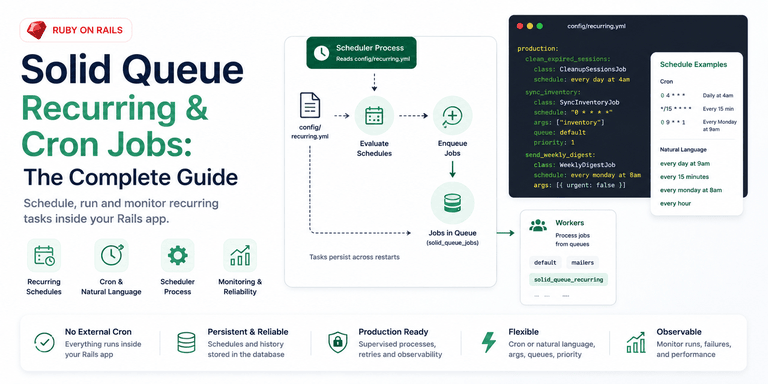
How recurring tasks are defined
Solid Queue reads recurring tasks from config/recurring.yml. The file is sectioned by environment, exactly like database.yml, which is good because deployed apps and development rarely want the same schedule:
# config/recurring.yml
production:
  clean_expired_sessions:
    class: CleanupSessionsJob
    schedule: every day at 4am

  sync_inventory:
    class: SyncInventoryJob
    schedule: "0 * * * *"

development:
  clean_expired_sessions:
    class: CleanupSessionsJob
    schedule: every 5 minutes
The top-level key is the environment. Under it, each task key (clean_expired_sessions, sync_inventory) is Solid Queue's internal identifier for that scheduled task. Treat it like a database key, not a label you casually rename during cleanup. Solid Queue uses it to track runs.
Each task needs two things: what to run and when to run it. If you used the Rails 8 authentication generator, which creates session records that need periodic pruning, a nightly CleanupSessionsJob like the one above is a normal recurring task. The useful detail is that the cleanup now sits beside the app code instead of in a crontab on a server you only remember during incidents.
If you are coming from the whenever gem, the mapping is straightforward:
| Concern | whenever gem | Solid Queue recurring.yml |
|---|---|---|
| Schedule definition | every 1.day, at: '4:00am' in a Ruby DSL |
schedule: every day at 4am in YAML |
| Config location | config/schedule.rb, compiled into the crontab |
config/recurring.yml, versioned in the app |
| Deployment step | whenever --update-crontab on the server |
bin/jobs reads the file at boot |
| External dependency | Needs a crontab and a cron daemon | Runs inside the app's job supervisor |
class vs command in recurring.yml: which should you use?
A class task enqueues one of your Active Job classes. A command task evaluates a string of Ruby inside SolidQueue::RecurringJob. Both work, but they do not behave the same once you need logs, retries, queue names, and a clear failure in Mission Control.
| Approach | Routes to | Use when | Needs a worker on its queue? | On failure |
|---|---|---|---|---|
class |
The job's own queue | Anything beyond a trivial one-liner | No (uses your existing queues) | Retries per your retry_on config; shows as the real class name in Mission Control |
command |
solid_queue_recurring |
A genuinely trivial inline expression | Yes, a worker must process solid_queue_recurring |
Retries as SolidQueue::RecurringJob; not identifiable by task name in Mission Control |
class enqueues one of your Active Job classes on its schedule:
send_weekly_digest:
  class: WeeklyDigestJob
  schedule: every monday at 8am
The job lands in whatever queue WeeklyDigestJob already uses, and your normal workers pick it up. This is what I want most of the time because the scheduled thing is still a real job class. You can test it directly, retry it intentionally, and search logs by its name.
command evaluates a string of Ruby in the context of a built-in SolidQueue::RecurringJob:
expire_trials:
  command: "Account.expiring_today.find_each(&:expire!)"
  schedule: every day at 1am
This saves you writing a one-line wrapper job. The catch is that command-based tasks are enqueued to the solid_queue_recurring queue, not your default queue. If no worker is watching that queue, the task is scheduled correctly and then sits there doing nothing. That is a frustrating failure mode because the scheduler did its job; the worker config is what is missing.
# config/queue.yml
production:
  workers:
    - queues: [default, solid_queue_recurring]
      threads: 3
My rule is simple: if the task is more than one boring line, write a real job and use class. A recurring entry should point at code you can call in a test. Hiding real workflow inside a YAML string is the same kind of inlined orchestration problem that makes service layers hard to reason about later.
Cron expressions and Fugit natural language
Solid Queue schedule strings are parsed by Fugit, so you can use standard five-field cron expressions or plain English. Cron strings are still useful when you want exactness:
| Schedule | Meaning |
|---|---|
"0 4 * * *" |
Every day at 4am |
"*/15 * * * *" |
Every 15 minutes |
"0 9 * * 1" |
Every Monday at 9am |
"0 */4 * * *" |
Every 4 hours |
Natural language is easier to scan in a small app:
| Schedule | Meaning |
|---|---|
every day at 9am |
Daily, 9am |
every 15 minutes |
Quarter-hourly |
every monday at 8am |
Weekly |
every hour |
Hourly |
Pick one style per file if you can. The trap, in either style, is time zones. A bare schedule is interpreted in the process time zone, so every day at 9am on a UTC server is not 9am in New York, London, or wherever your users expect it. Fugit lets you pin a zone directly in a cron string by appending it as the last field:
charge_subscriptions:
  class: SubscriptionChargeJob
  schedule: "0 9 * * * America/New_York"
If the job is tied to a business day, billing cutoff, digest email, or customer expectation, pin the zone. Server time is not a product requirement.
Passing arguments
Use args when the schedule is the same but the work needs a small piece of input. It can be a single value, a hash, or an array, with keyword arguments as the final hash element:
generate_report:
  class: ReportGenerationJob
  schedule: every day at 6am
  args: ["sales"]

notify_admins:
  class: NotifyJob
  schedule: every monday at 9am
  args:
    - "weekly"
    - { urgent: false }
You can also set queue to override the destination queue and priority for an integer Active Job priority. I reach for args when the schedule is stable but the target changes: a report type, tenant id, region, or integration connection. The Xero integration token-refresh pattern is a good fit: one refresh job class, with the organization's identifier passed in instead of duplicating the same job body under several task names.
Running the scheduler
The YAML file only declares the schedule. Something still has to run it. bin/jobs starts workers, dispatchers, and the scheduler together in a single supervisor. For small apps that want one process, plugin :solid_queue in config/puma.rb runs the scheduler inside Puma. Until one of those is alive, no recurring task fires.
With Kamal, run the scheduler through the same app image as a jobs role in config/deploy.yml, or run it inside Puma with plugin :solid_queue for a small single-process app. Do not model it as a Kamal accessory: accessories are for supporting services like PostgreSQL and Redis, and they are managed separately from normal app deploys. Otherwise you can update the web app and leave the old scheduler process running the old schedule, which is exactly the kind of split-brain deployment detail that shows up as "why did the old digest still send?"
As its own process:
bin/jobs
Or inside Puma, so you do not manage a second process at all:
# config/puma.rb
plugin :solid_queue
Either way, the scheduler reads recurring.yml, writes a row per task into solid_queue_recurring_tasks on boot, and then enqueues each task's job when its schedule fires. Static tasks persist across restarts, so killing and redeploying the process does not drop your schedule. The trade-off is that static tasks are edited like code. Removing one means changing the file and redeploying.
Solid Queue reads recurring.yml once at boot. Adding or changing a task requires restarting the scheduler process. A normal deploy that restarts bin/jobs is enough. Editing the file on the server and expecting hot reload is not.
The gotcha: enqueued once, not run once
Solid Queue guarantees that each recurring task is enqueued exactly once for a scheduled time, even if several scheduler processes are running. It does that with a unique database index keyed on the task and run time. Every scheduler races to insert the same row. One wins.
That is not the same as "the job body runs exactly once." Active Job delivery is at-least-once. A worker can die mid-job. A deploy can interrupt execution. A retry can run the same job again.
So the schedule can be reliable while the job body still needs to be idempotent. A nightly cleanup should be safe to run twice. A digest should not send duplicate emails for the same period. A subscription charge should have a unique business key so the second attempt sees that the charge already happened. If your "charge subscriptions" job cannot survive a second execution, it is waiting for the wrong deploy at the wrong minute.
Bulk delete and update jobs deserve extra care. Without index coverage on the columns a recurring cleanup job queries, a nightly delete_where can lock a table every time it runs and turn a harmless cleanup into the thing everyone notices in the morning. The at-least-once model applies across the whole Solid stack, and the Rails 8 Solid Stack overview covers the broader failure modes worth planning for.
For visibility, wire up Mission Control Jobs. It gives you the recurring task history next to the normal job queues, which beats discovering a missing report from a Slack message the next morning.
Turning recurring off in staging and review apps
Set SOLID_QUEUE_SKIP_RECURRING=true, or pass --skip-recurring to bin/jobs, in staging and review apps. Workers still process on-demand jobs; only the recurring scheduler is silenced.
SOLID_QUEUE_SKIP_RECURRING=true
This is one of those flags that looks minor until a review app shares a live-like database and sends a real digest or charges a test subscription. Keep the environment sections in recurring.yml, and still skip recurring in places that should not initiate scheduled work.
Dynamic recurring tasks
Use SolidQueue.schedule_recurring_task when the schedule is user-defined and cannot live in a deploy-time YAML file. A per-account "send my report every Friday" preference is different from a global nightly cleanup. The first belongs in data. The second belongs in recurring.yml.
Enable polling for dynamic tasks in queue.yml:
# config/queue.yml
production:
  scheduler:
    dynamic_tasks_enabled: true
    polling_interval: 5
Concrete cases: per-account digest preferences, user-configured report timing, or multi-tenant apps where each tenant has its own recurring work. It also fits AI agents built in Ruby that poll for new data or run inference on a schedule.
The cost is auditability. Dynamic tasks do not appear in recurring.yml, so you need your own admin view or console query to understand what exists. I would keep static schedules static until a user-facing scheduling feature forces the dynamic path.
Test your schedules before they fail silently
Add a spec that calls Fugit.parse on every schedule string in config/recurring.yml. The method returns nil on invalid input, so the spec catches silent typos before they become missing scheduled jobs.
This matters because a bad schedule does not always fail loudly where you want it to. The task just never fires, and the first signal may be the finance report nobody got. A parse-and-iterate spec over the schedule file is cheap insurance.
Before writing a spec, you can also confirm a task was registered at boot. SolidQueue::RecurringTask.pluck(:key, :schedule) in a Rails console returns every task the scheduler loaded. If your task key is absent, you are debugging registration: scheduler not started, wrong environment section, or a config parse problem. If the key is present but no job runs, you are debugging queues and workers.
This is the kind of typo the spec should catch:
production:
  weekly_digest:
    class: WeeklyDigestJob
    schedule: "61 25 * * *"
For that string, Fugit.parse("61 25 * * *") returns nil, so the expected failure is direct:
expected: not nil
     got: nil
# spec/recurring_schedule_spec.rb
require "rails_helper"

RSpec.describe "config/recurring.yml" do
  it "only contains valid schedules" do
    config = ActiveSupport::ConfigurationFile.parse(
      Rails.root.join("config/recurring.yml")
    )
    schedules = config.values.flat_map(&:values).map { |task| task["schedule"] }

    schedules.each do |schedule|
      expect(Fugit.parse(schedule)).not_to be_nil
    end
  end
end
When to use it, and when not to
For most Rails 8 apps, Solid Queue recurring tasks are the right default: one config file, no crontab, no whenever gem, no extra scheduler service. The schedule is an organizational assumption that belongs in version control beside the code it runs.
The edges are not exotic. Use class unless a command is truly trivial. Add solid_queue_recurring if you do use commands. Pin time zones for business-time work. Restart the scheduler when schedules change. Make the job body safe to run twice.
Heavier scheduling needs have better fits. For thousands of complex user-defined schedules, sidekiq-scheduler or sidekiq-cron paired with Sidekiq has had far more time under real workloads. For sub-second precision or rich calendar rules, a database-backed option like Que with pg_cron, or a purpose-built cron service, is the better tool. The Solid Queue vs Sidekiq vs GoodJob comparison covers the full trade-off.
For the daily-cleanup, hourly-sync, weekly-digest workload that describes most applications, Solid Queue is enough, and you remove a moving part from the app. If Redis is still there only for caching, Solid Cache does the same for caching: fewer external services, more of the application's behavior in Rails.
Do not use config/recurring.yml as a tenant-editable scheduler. If users can change the cadence, store those schedules in application tables, validate them, and enqueue through the dynamic path deliberately.
Three checks catch nearly every recurring setup that has drifted from what its author meant: each entry routes to a queue a worker actually runs, business-time schedules pin a time zone, and every job body is safe to fire twice. Run them against config/recurring.yml and the jobs it points at. A schedule that looks right in YAML and fires into a queue nobody works is the failure you find weeks late.
Further Reading
- Solid Queue in Rails 8: Setup Notes and Trade-offs
- Solid Queue vs Sidekiq vs GoodJob for Rails Jobs
- Sidekiq to Solid Queue Migration: Rails Runbook
- Solid Cache in Rails 8: When the Database Is the Right Cache
- Mission Control Jobs: Solid Queue Ops Setup
- Deploy Rails 8 with Kamal to a VPS: Setup Runbook