Mission Control Jobs: Production Monitoring for Rails 8
Set up Mission Control Jobs for production Rails 8 apps. Covers authentication, console API, bulk operations, alerting, and comparison with Sidekiq Web UI.
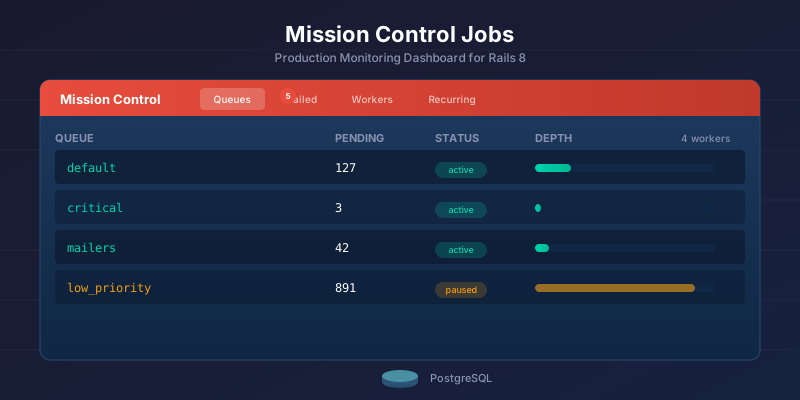
Mission Control Jobs is the monitoring dashboard your Solid Queue setup is missing. Install it, mount it, and you get a production-ready web UI for inspecting queues, retrying failed jobs, and watching workers - all without adding another service to your stack.
If you’ve already set up Solid Queue or migrated from Sidekiq, Mission Control is the next step. Here’s everything you need to run it in production, including the console API that most guides skip entirely.
Mission Control vs Sidekiq Web UI vs GoodJob Dashboard
Mission Control provides free queue management with built-in multi-app support and a powerful console API. Sidekiq Pro offers superior real-time metrics and throughput graphs. GoodJob’s dashboard sits between them with solid charting at no cost. Here’s the full comparison:
| Feature | Mission Control | Sidekiq Web UI | GoodJob Dashboard |
|---|---|---|---|
| Price | Free (MIT) | Free (basic) / $99+ (Pro) | Free (MIT) |
| Queue browsing | Yes | Yes | Yes |
| Pause/unpause queues | Yes | Yes (Pro) | No |
| Failed job retry | Individual + bulk | Individual + bulk | Individual + bulk |
| Job argument inspection | Yes (with filtering) | Yes | Yes |
| Worker monitoring | Yes | Yes | Yes |
| Real-time metrics | No | Yes (Pro) | Yes (charts) |
| Throughput graphs | No | Yes (Pro) | Yes |
| Job search/filter | By queue + class | By queue + class + args | By queue + class + args |
| Recurring job management | View only | Via sidekiq-cron | Full CRUD |
| Console API | Yes (powerful) | Limited | ActiveRecord queries |
| Multi-app support | Yes (built-in) | No | No |
| Sensitive arg filtering | Built-in config | Manual | Manual |
| Authentication | HTTP Basic + custom | Rack middleware | Rack middleware |
The dashboard choice usually follows the backend choice. If you’re still deciding between Solid Queue and Sidekiq, the Solid Queue setup guide covers the trade-offs in detail.
Installation
Add the gem and mount the engine:
# Gemfile
gem "mission_control-jobs"
# config/routes.rb
Rails.application.routes.draw do
  mount MissionControl::Jobs::Engine, at: "/jobs"

  # Your other routes...
end
bundle install
That’s it for development. Mission Control Jobs is maintained by 37signals (the team behind Basecamp and HEY) and reads directly from your Solid Queue database tables - no additional migrations, no separate database, no Redis. It requires Solid Queue 1.0.1 or higher.
Asset Pipeline Note
If you’re using Vite, jsbundling, or an API-only Rails app, you also need Propshaft for Mission Control’s assets:
# Gemfile - only needed if you don't already have an asset pipeline
gem "propshaft"
Then precompile in production:
RAILS_ENV=production rails assets:precompile
Most standard Rails 8 apps with Propshaft (the new default) won’t need this extra step.
Authentication in Production
Mission Control ships with HTTP Basic Auth enabled and locked down by default. No credentials configured means no access - it fails closed, which is the right default.
Option 1: HTTP Basic Auth (Simplest)
Generate credentials with the built-in task:
# Development
bin/rails mission_control:jobs:authentication:configure

# Production
RAILS_ENV=production bin/rails mission_control:jobs:authentication:configure
This stores credentials in Rails encrypted credentials:
# config/credentials.yml.enc (after decryption)
mission_control:
  http_basic_auth_user: admin
  http_basic_auth_password: your-secure-password
Or set them manually in an initializer:
# config/initializers/mission_control.rb
Rails.application.configure do
  config.mission_control.jobs.http_basic_auth_user = Rails.application.credentials.dig(:mission_control, :http_basic_auth_user)
  config.mission_control.jobs.http_basic_auth_password = Rails.application.credentials.dig(:mission_control, :http_basic_auth_password)
end
HTTP Basic Auth works fine for small teams and solo developers. It’s what I use on most projects where I’m the only one checking the dashboard.
Option 2: Rails 8 Authentication (Recommended)
Rails 8 ships with a built-in authentication generator. If you’re already using it, plug Mission Control into the same auth flow:
# app/controllers/admin_controller.rb
class AdminController < ApplicationController
  before_action :require_admin

  private

  def require_admin
    # Use Rails 8 authentication
    redirect_to root_path unless authenticated? && Current.user.admin?
  end
end
# config/environments/production.rb
config.mission_control.jobs.base_controller_class = "AdminController"
config.mission_control.jobs.http_basic_auth_enabled = false
This gives you proper session-based authentication with your existing user model. Users log in through your normal login flow and get access to Mission Control if they’re admins.
Option 3: Devise
Same pattern, different auth library:
# app/controllers/admin_controller.rb
class AdminController < ApplicationController
  before_action :authenticate_user!
  before_action :require_admin_role

  private

  def require_admin_role
    redirect_to root_path, alert: "Not authorized" unless current_user.admin?
  end
end
# config/environments/production.rb
config.mission_control.jobs.base_controller_class = "AdminController"
config.mission_control.jobs.http_basic_auth_enabled = false
IP Restriction (Extra Layer)
For production, consider adding IP restrictions on top of authentication:
# app/controllers/admin_controller.rb
class AdminController < ApplicationController
  before_action :restrict_ip
  before_action :authenticate_user!

  private

  def restrict_ip
    allowed_ips = ENV.fetch("ADMIN_ALLOWED_IPS", "").split(",")
    unless allowed_ips.empty? || allowed_ips.include?(request.remote_ip)
      head :forbidden
    end
  end
end
What the Dashboard Shows You
Once mounted, you get four main views at /jobs:
Queues Tab
Lists all your Solid Queue queues with pending job counts. You can:
- See how many jobs are waiting in each queue
- Pause a queue (stops workers from picking up new jobs)
- Unpause a queue (resumes processing)
- Click into a queue to browse individual pending jobs
Queue pausing is the feature I use most during deployments. Pause the queue, deploy, verify the new code works, then unpause. No jobs lost, no race conditions.
Failed Jobs Tab
Shows every job that raised an unhandled exception. For each failed job you see:
- Job class name
- Queue it was running on
- Error class and message
- Full backtrace (with Rails backtrace cleaning)
- Job arguments (with optional filtering for sensitive data)
- When it failed
You can retry individual jobs or select multiple jobs for bulk retry/discard.
In-Progress Jobs
Shows jobs currently being executed by workers. Useful for identifying:
- Long-running jobs that might be stuck
- Which workers are busy vs idle
- Whether a specific job class is monopolizing your workers
Workers Tab
Lists all active Solid Queue worker processes with their:
- Process ID and hostname
- Queue assignments
- Currently executing job (if any)
The Console API
Mission Control extends ActiveJob with a query interface you can use in the Rails console to filter, retry, and discard jobs in bulk. Run ActiveJob.jobs.failed.where(job_class_name: "SomeJob").retry_all to retry thousands of failed jobs in one command. The web dashboard covers 80% of what you need day-to-day - the console API covers the other 20%, the incident response and bulk operations that matter most when things go wrong.
Start a Rails console and you get immediate access:
bin/rails console
# => Type 'jobs_help' to see available servers
Querying Jobs
# All failed jobs
ActiveJob.jobs.failed
# => Returns a relation-like object you can chain

# Failed jobs for a specific class
ActiveJob.jobs.failed.where(job_class_name: "PaymentProcessorJob")

# Pending jobs in a specific queue
ActiveJob.jobs.pending.where(queue_name: "critical")

# Scheduled jobs (waiting for their run time)
ActiveJob.jobs.scheduled

# Currently executing jobs
ActiveJob.jobs.in_progress

# Finished jobs (if you have Solid Queue's finished job retention enabled)
ActiveJob.jobs.finished

# Pagination
ActiveJob.jobs.failed.limit(10).offset(0)
Bulk Operations
This is where the console API saves you during incidents:
# Retry ALL failed jobs
ActiveJob.jobs.failed.retry_all

# Retry only failed jobs of a specific class
ActiveJob.jobs.failed.where(job_class_name: "EmailDeliveryJob").retry_all

# Discard all failed jobs in a queue (they're not coming back)
ActiveJob.jobs.failed.where(queue_name: "low_priority").discard_all

# Discard pending jobs of a specific class
# Useful when you deployed a broken job and need to clear the queue
ActiveJob.jobs.pending.where(job_class_name: "BrokenJob").discard_all
For large bulk operations, add a delay between batches to avoid hammering your database:
# Process in batches with a 2-second pause between each
MissionControl::Jobs.delay_between_bulk_operation_batches = 2.seconds
ActiveJob.jobs.failed.retry_all
Production Incident Example
Here’s a real scenario: you deployed a code change that broke OrderSyncJob. Thousands of jobs failed before you noticed. Here’s the recovery:
# 1. See the damage
ActiveJob.jobs.failed.where(job_class_name: "OrderSyncJob").count
# => 3,847

# 2. Check a sample to confirm it's the same error
ActiveJob.jobs.failed.where(job_class_name: "OrderSyncJob").limit(5).each do |job|
  puts "#{job.job_id}: #{job.error.message}"
end

# 3. Deploy the fix first, then retry in batches
MissionControl::Jobs.delay_between_bulk_operation_batches = 3.seconds
ActiveJob.jobs.failed.where(job_class_name: "OrderSyncJob").retry_all
# => Jobs retry in batches of 1000 with 3-second pauses
Filtering Sensitive Arguments
Job arguments often contain data you don’t want visible in a dashboard - API keys, tokens, personal information. Mission Control has built-in argument filtering:
# config/initializers/mission_control.rb
Rails.application.configure do
  config.mission_control.jobs.filter_arguments = [
    :password,
    :token,
    :api_key,
    :secret,
    :ssn,
    :credit_card
  ]
end
Filtered arguments show as [FILTERED] in both the web UI and console output. This works the same way as Rails parameter filtering - any argument key matching the list gets masked.
Building Alerting Around Mission Control
Here’s the gap nobody talks about: Mission Control is a dashboard, not a monitoring system. It shows you job failures when you look at it. It does not page you at 3am when your payment processing queue backs up.
You need to build that layer yourself. Here are three approaches:
Approach 1: ActiveSupport Notifications + Error Tracker
The simplest approach - let your error tracker (Sentry, Honeybadger, Bugsnag) handle job failure alerting:
# app/jobs/application_job.rb
class ApplicationJob < ActiveJob::Base
  # Solid Queue doesn't auto-retry, so this is your retry policy
  retry_on StandardError, wait: :polynomially_longer, attempts: 3

  # After all retries exhausted, report to error tracker
  discard_on StandardError do |job, error|
    Rails.error.report(error, context: {
      job_class: job.class.name,
      job_id: job.job_id,
      queue: job.queue_name,
      arguments: job.arguments
    }, severity: :error)
  end
end
Your error tracker already has alerting, PagerDuty integration, and deduplication. Use what you have.
Approach 2: Health Check Endpoint
Add a health check that monitoring tools can poll:
# app/controllers/health_controller.rb
class HealthController < ApplicationController
  # GET /health/jobs
  def jobs
    checks = {
      failed_jobs: SolidQueue::FailedExecution.count,
      blocked_jobs: SolidQueue::BlockedExecution.count,
      oldest_pending: SolidQueue::ReadyExecution.minimum(:created_at),
      workers_active: SolidQueue::Process.where(kind: "Worker").count
    }

    # Alert if too many failures or queue is backing up
    healthy = checks[:failed_jobs] < 100 &&
              checks[:workers_active] > 0 &&
              (checks[:oldest_pending].nil? || checks[:oldest_pending] > 10.minutes.ago)

    render json: checks.merge(healthy: healthy),
           status: healthy ? :ok : :service_unavailable
  end
end
Point your uptime monitor (Pingdom, UptimeRobot, or even a simple cron curl) at this endpoint. A 503 response triggers your alert.
Approach 3: Recurring Monitoring Job
Use Solid Queue’s own recurring jobs to monitor itself:
# app/jobs/queue_health_check_job.rb
class QueueHealthCheckJob < ApplicationJob
  queue_as :monitoring

  def perform
    failed_count = SolidQueue::FailedExecution.count
    oldest_pending = SolidQueue::ReadyExecution.minimum(:created_at)

    if failed_count > 50
      AdminMailer.job_alert(
        subject: "#{failed_count} failed jobs in queue",
        details: failed_job_summary
      ).deliver_now  # deliver_now, not deliver_later!
    end

    if oldest_pending && oldest_pending < 15.minutes.ago
      AdminMailer.job_alert(
        subject: "Job queue backing up - oldest job #{time_ago_in_words(oldest_pending)} old",
        details: queue_depth_summary
      ).deliver_now
    end
  end

  private

  def failed_job_summary
    SolidQueue::FailedExecution
      .joins(:job)
      .group("solid_queue_jobs.class_name")
      .count
      .sort_by { |_, count| -count }
      .first(10)
      .map { |klass, count| "#{klass}: #{count}" }
      .join("\n")
  end

  def queue_depth_summary
    SolidQueue::ReadyExecution
      .joins(:job)
      .group("solid_queue_jobs.queue_name")
      .count
      .map { |queue, count| "#{queue}: #{count} pending" }
      .join("\n")
  end
end
# config/recurring.yml
queue_health_check:
  class: QueueHealthCheckJob
  schedule: every 5 minutes
Notice deliver_now instead of deliver_later - if your job queue is the thing that’s broken, you don’t want to enqueue another job to send the alert.
Configuration Reference
Here are all the Mission Control settings worth tuning for production:
# config/initializers/mission_control.rb
Rails.application.configure do
  # Authentication
  config.mission_control.jobs.http_basic_auth_enabled = true
  config.mission_control.jobs.base_controller_class = "AdminController"

  # Filter sensitive job arguments from the UI
  config.mission_control.jobs.filter_arguments = [:password, :token, :api_key]

  # Limit count queries to prevent slow page loads on large tables
  # Default: 500,000 - lower this if your dashboard is slow
  config.mission_control.jobs.internal_query_count_limit = 100_000

  # Mark scheduled jobs as "delayed" after this threshold
  # Default: 1 minute
  config.mission_control.jobs.scheduled_job_delay_threshold = 5.minutes

  # Batch size for queries and bulk operations
  # Default: 1000
  config.active_job.default_page_size = 1000

  # Delay between bulk operation batches (retry_all, discard_all)
  # Default: 0 (no delay) - increase for large bulk ops
  config.mission_control.jobs.delay_between_bulk_operation_batches = 0
end
Performance Tuning
The internal_query_count_limit setting matters most for production. Mission Control runs count queries on your job tables to show queue depths. With millions of rows, these queries get slow. The default cap of 500,000 means Mission Control shows “500,000+” instead of running a full table scan.
If your dashboard loads slowly, lower this:
config.mission_control.jobs.internal_query_count_limit = 50_000
Multi-App Monitoring
One feature that sets Mission Control apart: you can monitor multiple applications from a single dashboard. If you run several Rails apps with Solid Queue, configure them all in one central monitoring app:
# config/initializers/mission_control.rb

# Register multiple apps
MissionControl::Jobs.applications.add(
  "main_app",
  { primary: ActiveJob::QueueAdapters.lookup(:solid_queue).new }
)

MissionControl::Jobs.applications.add(
  "billing_service",
  { primary: ActiveJob::QueueAdapters.lookup(:solid_queue).new }
)
This is useful for teams running a modular monolith or multiple services that all use Solid Queue. One dashboard, multiple queue backends.
Production Checklist
Before deploying Mission Control to production:
- Authentication configured (not using default empty credentials)
filter_argumentsset for any sensitive job data (tokens, PII, API keys)internal_query_count_limittuned if you have large job tables- Alerting configured separately (error tracker, health check, or monitoring job)
- IP restrictions considered for the
/jobsroute scheduled_job_delay_thresholdset to match your SLA expectations- Tested bulk retry/discard in staging before production incident
Trade-offs and Limitations
What Mission Control Does Well
- Zero-configuration monitoring for Solid Queue
- Clean, focused UI that doesn’t overwhelm
- Console API for incident response is genuinely powerful
- Multi-app support out of the box
- Argument filtering for compliance
What It Lacks
- No real-time metrics - you can’t see throughput trends, processing times, or queue depth over time. Sidekiq Pro’s real-time dashboard is significantly better for performance tuning.
- No alerting - it’s purely reactive. You need to build alerting separately.
- No job search by arguments - you can filter by queue and class, but not by specific argument values. Investigating “what happened to user 12345’s job” requires the console.
- No historical data - once a job is processed and cleaned up, it’s gone from Mission Control. There’s no retention or historical view unless you configure Solid Queue to keep finished jobs.
- Limited recurring job management - you can view recurring jobs but can’t create, edit, or toggle them from the UI. Changes require editing
recurring.ymland redeploying.
When Mission Control Is Not Enough
If you need real-time performance dashboards, consider pairing Mission Control with:
- Application Performance Monitoring (Datadog, New Relic, Scout) for throughput metrics and latency tracking
- Error tracking (Sentry, Honeybadger) for job failure alerting and investigation
- Custom dashboards (Grafana + PostgreSQL queries) for historical job metrics
Mission Control handles the “what’s happening right now” and “fix this broken job” workflows. APM handles “how is our job system performing over time.”
The Bottom Line
Mission Control Jobs fills the operational gap between “I set up Solid Queue” and “I can manage it in production.” The web dashboard handles daily monitoring, the console API handles incidents, and the whole thing runs on your existing database with zero additional infrastructure.
It’s not Sidekiq Pro’s dashboard - it’s simpler, less real-time, and you need to build alerting yourself. But for the price (free) and the setup effort (one gem, two lines of config), it’s the obvious choice for any Solid Queue deployment.
What’s Next?
If you haven’t set up Solid Queue yet, start with the setup guide. If you’re migrating from Sidekiq, the migration guide covers the full cutover process including how to handle the dashboard transition.
Need help with production monitoring for Rails background jobs? I help teams with job infrastructure, operational resilience, and Solid Queue adoption. If you’re setting up monitoring or scaling your job system, reach out at nikita.sinenko@gmail.com.