TimescaleDB in Rails: A Practical Implementation Guide
Implement TimescaleDB in Rails with hypertable migrations, columnar compression, continuous aggregates, retention policies, and testing helpers for production.
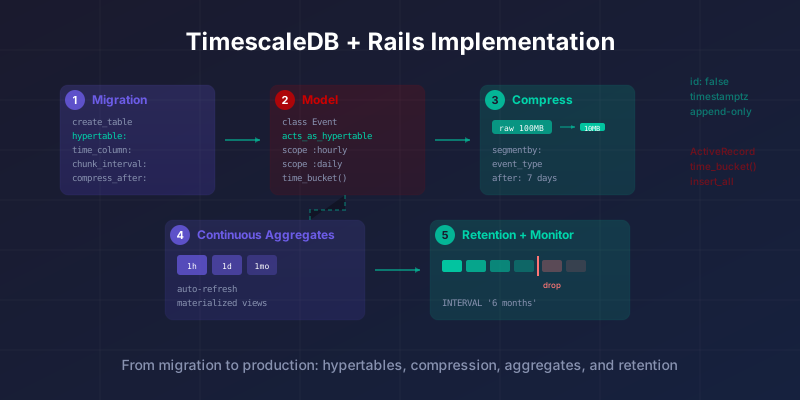
My previous post covered when TimescaleDB makes sense in Rails - and when it doesn’t. Readers wanted the “how.” This is that post.
I’m going to walk through a complete TimescaleDB implementation in a Rails application, from initial setup through compression, retention, continuous aggregates, and the testing gotchas that nobody warns you about. The scenario is a real one I’ve encountered multiple times: an analytics events table that has outgrown plain PostgreSQL and needs time-series treatment.
If you haven’t read the previous post, the short version is this: TimescaleDB is the right choice when your data is append-only, time-indexed, and growing predictably. If that describes your situation, read on.
Hypertable vs Regular Table: What Changes
| Regular PostgreSQL Table | TimescaleDB Hypertable | |
|---|---|---|
| Primary key | Auto-incrementing id |
No surrogate key (id: false), time column is the primary dimension |
| Partitioning | Manual or none | Automatic time-based chunks |
| Writes | INSERT, UPDATE, DELETE equally supported | Optimized for INSERT; UPDATE/DELETE slower, impossible on compressed chunks |
| Compression | None built-in | Columnar compression with 90%+ storage reduction |
| Retention | Manual DELETE queries (slow, locks table) |
add_retention_policy drops entire chunks instantly |
| Aggregation | Computed on every query | Continuous aggregates precompute and auto-refresh |
| ActiveRecord | Full compatibility | Works, but update/destroy should be avoided; some raw SQL needed |
| Schema dumps | schema.rb works perfectly |
Requires structure.sql or test helpers to preserve hypertable metadata |
Choosing Your Gem
Use the timescaledb gem for most Rails projects. Maintained by Timescale themselves, it provides acts_as_hypertable, schema dumper integration, continuous aggregate helpers, and a rich model-level DSL. It’s opinionated in the right places and handles the ActiveRecord integration thoughtfully.
The alternative is timescaledb-rails, which extends the ActiveRecord PostgreSQL adapter directly. It provides migration helpers like create_hypertable and enable_hypertable_compression as first-class migration methods. It’s lighter, closer to raw SQL, and better if you want minimal abstraction.
timescaledb gem |
timescaledb-rails gem |
|
|---|---|---|
| Maintainer | Timescale (official) | Crunchloop (community) |
| Approach | Model-level DSL | ActiveRecord adapter extension |
| Key features | acts_as_hypertable, continuous aggregate helpers, schema dumper |
create_hypertable migration method, compression helpers |
| Abstraction | Higher - more Rails-like | Lower - closer to raw SQL |
| Best for | Most teams; full-featured integration | Teams wanting minimal abstraction |
For this guide, I’m going to use the timescaledb gem because it covers more ground. But the underlying concepts are the same regardless of which gem you choose, and I’ll note where the approaches diverge.
Installation and Database Setup
Start with the gem:
# Gemfile
gem 'timescaledb'
TimescaleDB is a PostgreSQL extension, not a separate database. If you’re running PostgreSQL locally, you’ll need to install the extension. On macOS with Homebrew:
brew install timescaledb
timescaledb-tune --quiet --yes
On Ubuntu/Debian:
sudo apt install timescaledb-2-postgresql-16
sudo timescaledb-tune --quiet --yes
sudo systemctl restart postgresql
Then enable the extension in your database. You can do this via a migration:
class EnableTimescaledb < ActiveRecord::Migration[7.2]
  def change
    enable_extension 'timescaledb' unless extension_enabled?('timescaledb')
  end
end
If you’re running on a managed PostgreSQL service, check whether TimescaleDB is supported. Some providers bundle it, some offer it as an add-on, and some don’t support it at all. This is worth verifying before you commit to anything.
The Initializer
Set up the gem in an initializer so your models have access to the TimescaleDB macros:
# config/initializers/timescaledb.rb
ActiveSupport.on_load(:active_record) do
  extend Timescaledb::ActsAsHypertable
end
This makes acts_as_hypertable available on all models. If you’d prefer to be explicit, you can skip the initializer and extend individual models instead.
Creating Your First Hypertable
Here’s where things diverge from standard Rails patterns. A hypertable is a PostgreSQL table that TimescaleDB automatically partitions by time. The key difference from a normal table: you typically don’t want an auto-incrementing id column. TimescaleDB partitions by time, and a sequential integer primary key fights that partitioning.
Let’s create an analytics_events hypertable for tracking user activity:
class CreateAnalyticsEvents < ActiveRecord::Migration[7.2]
  def up
    hypertable_options = {
      time_column: 'occurred_at',
      chunk_time_interval: '1 day',
      compress_segmentby: 'event_type',
      compress_orderby: 'occurred_at DESC',
      compress_after: '7 days'
    }

    create_table(:analytics_events, id: false, hypertable: hypertable_options) do |t|
      t.timestamptz :occurred_at, null: false
      t.references :user, null: false, foreign_key: true
      t.string :event_type, null: false
      t.string :resource_type
      t.bigint :resource_id
      t.jsonb :properties, default: {}
      t.inet :ip_address
      t.string :user_agent
    end

    add_index :analytics_events, [:event_type, :occurred_at]
    add_index :analytics_events, [:user_id, :occurred_at]
  end

  def down
    drop_table :analytics_events
  end
end
A few things to notice here.
The id: false is intentional. Hypertables don’t need surrogate keys because rows are identified by their time dimension plus whatever natural key makes sense for your data. If you absolutely need a unique identifier per row, use a UUID column instead of an auto-incrementing integer, but consider whether you need it.
The chunk_time_interval determines how TimescaleDB partitions data. One day per chunk is reasonable for most Rails applications writing thousands to hundreds of thousands of events per day. If you’re writing millions per day, consider a shorter interval. The goal is chunks that are large enough to be worth partitioning but small enough that the planner can skip irrelevant ones efficiently.
The compression settings are declared upfront. compress_segmentby tells TimescaleDB which column to use for grouping compressed data, and compress_after defines how soon chunks become eligible for compression. Seven days is a conservative starting point: recent data stays uncompressed for fast writes and queries, while older data gets compressed for storage savings.
The Model
# app/models/analytics_event.rb
class AnalyticsEvent < ApplicationRecord
  acts_as_hypertable time_column: 'occurred_at'

  belongs_to :user
  belongs_to :resource, polymorphic: true, optional: true

  validates :event_type, presence: true
  validates :occurred_at, presence: true

  scope :of_type, ->(type) { where(event_type: type) }
  scope :for_user, ->(user) { where(user_id: user.id) }
  scope :in_range, ->(range) { where(occurred_at: range) }
end
The acts_as_hypertable macro gives your model awareness of its hypertable nature. It adds scopes like last_week, this_month, yesterday, and today automatically. It also provides access to hypertable metadata through AnalyticsEvent.hypertable, which returns information about chunks, dimensions, and compression state.
One thing to internalize: this model does not behave like a typical ActiveRecord model in some important ways. You should avoid calling update or update! on records. Hypertables are optimized for append-only workloads. Updates work, but they’re slower than on regular tables, and they become significantly slower once compression is enabled. If you need to correct data, prefer deleting and reinserting over updating in place.
Recording Events
The write path should be straightforward:
class EventTracker
  def self.track(user:, event_type:, resource: nil, properties: {}, request: nil)
    AnalyticsEvent.create!(
      user: user,
      event_type: event_type,
      occurred_at: Time.current,
      resource: resource,
      properties: properties,
      ip_address: request&.remote_ip,
      user_agent: request&.user_agent
    )
  end
end
For high-throughput scenarios, consider batching inserts. ActiveRecord’s insert_all works with hypertables:
class EventTracker
  def self.track_batch(events)
    AnalyticsEvent.insert_all(
      events.map do |event|
        {
          user_id: event[:user].id,
          event_type: event[:event_type],
          occurred_at: event[:occurred_at] || Time.current,
          resource_type: event[:resource]&.class&.name,
          resource_id: event[:resource]&.id,
          properties: (event[:properties] || {}).to_json
        }
      end
    )
  end
end
Batch inserts bypass validations, so make sure your data is clean before it gets here. In production, I typically run validation logic in the caller and use insert_all as a dumb pipe.
Querying with time_bucket
TimescaleDB’s time_bucket function is the workhorse of time-series queries. It groups rows into fixed time intervals, which is exactly what you need for dashboards, trend analysis, and aggregation.
ActiveRecord can express these queries, but you’ll be writing some SQL. This is one of those places where dropping below the abstraction is the right call:
# Events per hour over the last 24 hours
AnalyticsEvent
  .select("time_bucket('1 hour', occurred_at) AS bucket, count(*) AS total")
  .where(occurred_at: 24.hours.ago..Time.current)
  .group('bucket')
  .order('bucket')
For more complex aggregations, wrap them in scopes:
class AnalyticsEvent < ApplicationRecord
  acts_as_hypertable time_column: 'occurred_at'

  scope :hourly_counts, -> {
    select("time_bucket('1 hour', occurred_at) AS bucket, event_type, count(*) AS total")
      .group('bucket, event_type')
      .order('bucket')
  }

  scope :daily_counts, -> {
    select("time_bucket('1 day', occurred_at) AS bucket, event_type, count(*) AS total")
      .group('bucket, event_type')
      .order('bucket')
  }

  scope :daily_unique_users, -> {
    select("time_bucket('1 day', occurred_at) AS bucket, count(DISTINCT user_id) AS unique_users")
      .group('bucket')
      .order('bucket')
  }
end
These scopes compose naturally with other scopes:
AnalyticsEvent.of_type('page_view').in_range(1.week.ago..Time.current).daily_counts
The query planner is doing real work here. Because the data is partitioned by time, queries with time predicates only scan the relevant chunks. A query for the last 24 hours against a table with a year of data will not touch 364 days worth of partitions. This is the core performance benefit, and it happens automatically.
Compression in Practice
Compression is where TimescaleDB starts saving you real money. Uncompressed time-series data at scale is expensive, and TimescaleDB’s columnar compression can reduce storage by 90% or more depending on your data.
If you declared compression settings in your migration (as shown above), TimescaleDB will automatically compress chunks older than the compress_after interval. But you can also manage compression manually through the model:
# Check compression stats
AnalyticsEvent.hypertable.compression_stats

# See which chunks are compressed
AnalyticsEvent.hypertable.chunks.each do |chunk|
  puts "#{chunk.chunk_name}: compressed=#{chunk.is_compressed}"
end

# Manually compress old chunks
AnalyticsEvent.hypertable.chunks
  .where(is_compressed: false)
  .where('range_end < ?', 1.week.ago)
  .each(&:compress!)
One critical gotcha: you cannot update or delete individual rows in compressed chunks. If you need to modify compressed data, you must decompress the chunk first, make your changes, and then recompress. This is another reason to treat hypertable data as immutable.
Data Retention Policies
Retention policies let you automatically drop old data. This is essential for tables that grow indefinitely but where historical data beyond a certain age has no value.
You can set a retention policy in your migration:
class AddRetentionPolicyToAnalyticsEvents < ActiveRecord::Migration[7.2]
  def up
    execute "SELECT add_retention_policy('analytics_events', INTERVAL '6 months');"
  end

  def down
    execute "SELECT remove_retention_policy('analytics_events');"
  end
end
This automatically drops chunks older than six months. The key insight is that TimescaleDB drops entire chunks, not individual rows. This means retention cleanup is nearly instantaneous regardless of data volume, because it’s just dropping child tables. Compare that to a DELETE FROM events WHERE created_at < ? on a regular PostgreSQL table, which can lock the table and take hours on large datasets.
If you need to keep aggregated data longer than raw data, the pattern is: set a short retention policy on the hypertable, and use continuous aggregates (covered next) to preserve rolled-up summaries indefinitely.
Continuous Aggregates
Continuous aggregates are materialized views that TimescaleDB automatically refreshes. They solve the “dashboard query” problem: instead of aggregating millions of rows on every page load, you precompute the aggregation and query the result.
The timescaledb gem provides a DSL for defining continuous aggregates directly in your model:
class AnalyticsEvent < ApplicationRecord
  extend Timescaledb::ActsAsHypertable
  include Timescaledb::ContinuousAggregatesHelper

  acts_as_hypertable time_column: 'occurred_at'

  scope :events_by_type, -> {
    select("event_type, count(*) AS total")
      .group(:event_type)
  }

  scope :unique_users, -> {
    select("count(DISTINCT user_id) AS unique_users")
  }

  continuous_aggregates(
    scopes: [:events_by_type, :unique_users],
    timeframes: [:hour, :day, :month],
    refresh_policy: {
      hour: {
        start_offset: '4 hours',
        end_offset: '1 hour',
        schedule_interval: '1 hour'
      },
      day: {
        start_offset: '3 days',
        end_offset: '1 day',
        schedule_interval: '1 day'
      },
      month: {
        start_offset: '3 months',
        end_offset: '1 day',
        schedule_interval: '1 day'
      }
    }
  )
end
Then create them via a migration:
class CreateAnalyticsEventContinuousAggregates < ActiveRecord::Migration[7.2]
  def up
    AnalyticsEvent.create_continuous_aggregates
  end

  def down
    AnalyticsEvent.drop_continuous_aggregates
  end
end
This creates materialized views like analytics_events_events_by_type_per_hour, analytics_events_events_by_type_per_day, and so on. Each view is itself backed by a hypertable, so it inherits the same chunking and compression benefits.
Querying them feels natural:
# Hourly event breakdown, last 24 hours
AnalyticsEvent::EventsByTypePerHour
  .where(occurred_at: 24.hours.ago..Time.current)
  .all

# Daily unique users, last 30 days
AnalyticsEvent::UniqueUsersPerDay
  .where(occurred_at: 30.days.ago..Time.current)
  .all
The refresh policies control how often TimescaleDB updates the aggregate. The start_offset and end_offset define the time window that gets refreshed on each run. The schedule_interval controls how frequently the refresh job runs. These jobs run inside the database itself, so there’s no cron job or Sidekiq/Solid Queue worker to manage.
One architectural decision to make early: continuous aggregates survive data retention. If you drop raw data after six months but your monthly aggregate has been running the whole time, you’ll still have monthly summaries going back to the beginning. This is the right pattern for most analytics: keep raw data for short-term debugging and detailed queries, keep aggregates for long-term trends.
The Schema Dump Problem
This is the part that catches most Rails teams off guard. TimescaleDB’s hypertable metadata doesn’t survive a standard db:schema:dump and db:schema:load cycle cleanly. Your schema.rb won’t include the create_hypertable calls, compression policies, or continuous aggregates.
The timescaledb gem has improved this significantly with its custom schema dumper, but there are still edge cases. Here’s what I recommend:
Option 1: Use structure.sql instead of schema.rb. Set config.active_record.schema_format = :sql in your application config. This dumps the actual SQL structure, which preserves TimescaleDB metadata more faithfully. The downside is that structure.sql files are harder to read and diff.
Option 2: Stick with schema.rb but handle hypertable setup in test helpers. This is the approach I usually take:
# spec/support/timescaledb.rb
RSpec.configure do |config|
  config.before(:suite) do
    ActiveRecord::Base.connection.execute(
      "SELECT create_hypertable('analytics_events', 'occurred_at', if_not_exists => TRUE, migrate_data => TRUE);"
    )
  end
end
Or, if you’re using the timescaledb gem’s built-in support:
# spec/spec_helper.rb
RSpec.configure do |config|
  config.before(:suite) do
    hypertable_models = ActiveRecord::Base.descendants.select { |m|
      m.respond_to?(:acts_as_hypertable?) && m.acts_as_hypertable?
    }

    hypertable_models.each do |klass|
      next if klass.try(:hypertable).present?

      ApplicationRecord.connection.create_hypertable(
        klass.table_name,
        time_column: klass.hypertable_options[:time_column],
        chunk_time_interval: '1 day'
      )
    end
  end
end
This ensures your test database has proper hypertables even when loaded from schema.rb.
Using a Separate Database
For applications where TimescaleDB is handling a specific concern (analytics, metrics, audit logs) while the rest of the app uses plain PostgreSQL, the multi-database approach is clean and keeps concerns isolated.
Rails supports multiple databases natively since version 6:
# config/database.yml
development:
  primary:
    adapter: postgresql
    database: myapp_development
  timescale:
    adapter: postgresql
    database: myapp_timescale_development
    migrations_paths: db/timescale_migrate
Then create an abstract base class for your time-series models:
# app/models/timescale_record.rb
class TimescaleRecord < ApplicationRecord
  self.abstract_class = true

  connects_to database: { writing: :timescale, reading: :timescale }

  extend Timescaledb::ActsAsHypertable
end

# app/models/analytics_event.rb
class AnalyticsEvent < TimescaleRecord
  acts_as_hypertable time_column: 'occurred_at'
  # ...
end
This isolates TimescaleDB concerns from your main database entirely. Migrations for time-series tables go in db/timescale_migrate/, and you run them with rails db:migrate:timescale. The main benefit is operational: you can scale, tune, and manage your TimescaleDB instance independently from your primary database.
The trade-off is that you lose foreign key constraints across databases. The user_id column in analytics_events can’t have a real foreign key to the users table. You’ll need to enforce referential integrity at the application level instead. For append-only analytics data, this is usually an acceptable trade-off.
Converting an Existing Table
If you already have a large events table in PostgreSQL and want to convert it to a hypertable, TimescaleDB can do this, but you need to be careful about downtime and data migration.
The simplest path for small-to-medium tables (under 10 million rows):
class ConvertEventsToHypertable < ActiveRecord::Migration[7.2]
  def up
    # Remove the primary key if it exists
    execute "ALTER TABLE analytics_events DROP CONSTRAINT IF EXISTS analytics_events_pkey;"

    # Convert to hypertable with data migration
    execute <<-SQL
      SELECT create_hypertable(
        'analytics_events',
        'occurred_at',
        migrate_data => TRUE,
        chunk_time_interval => INTERVAL '1 day'
      );
    SQL
  end

  def down
    # There is no clean way to revert a hypertable to a regular table
    raise ActiveRecord::IrreversibleMigration
  end
end
For larger tables, migrate_data => TRUE can take a long time and will lock the table. The alternative is to create a new hypertable, backfill data in batches, then swap:
class MigrateEventsToHypertable < ActiveRecord::Migration[7.2]
  def up
    # Create new hypertable
    create_table(:analytics_events_new, id: false, hypertable: {
      time_column: 'occurred_at',
      chunk_time_interval: '1 day'
    }) do |t|
      t.timestamptz :occurred_at, null: false
      t.bigint :user_id, null: false
      t.string :event_type, null: false
      t.jsonb :properties, default: {}
    end

    # Backfill in batches
    execute <<-SQL
      INSERT INTO analytics_events_new
      SELECT occurred_at, user_id, event_type, properties
      FROM analytics_events
      ORDER BY occurred_at;
    SQL

    # Swap tables
    rename_table :analytics_events, :analytics_events_old
    rename_table :analytics_events_new, :analytics_events
  end

  def down
    rename_table :analytics_events, :analytics_events_new
    rename_table :analytics_events_old, :analytics_events
    drop_table :analytics_events_new
  end
end
The backfill approach takes longer overall but doesn’t hold locks for the duration. You’ll need to handle any events written during the migration window, which typically means a brief maintenance window or a dual-write strategy.
Production Monitoring
Once TimescaleDB is running in production, you’ll want visibility into how it’s performing. A few queries worth running periodically or wiring into your monitoring:
# Check hypertable sizes
ActiveRecord::Base.connection.execute(
  "SELECT hypertable_name, pg_size_pretty(hypertable_size(format('%I', hypertable_name)::regclass)) AS size
   FROM timescaledb_information.hypertables;"
).to_a

# Check chunk compression status
ActiveRecord::Base.connection.execute(
  "SELECT chunk_name,
          pg_size_pretty(before_compression_total_bytes) AS before,
          pg_size_pretty(after_compression_total_bytes) AS after
   FROM chunk_compression_stats('analytics_events')
   ORDER BY chunk_name DESC
   LIMIT 10;"
).to_a

# Check running background jobs
ActiveRecord::Base.connection.execute(
  "SELECT * FROM timescaledb_information.jobs
   WHERE hypertable_name = 'analytics_events';"
).to_a
Wire these into your existing monitoring. If compression jobs start failing or chunks start growing unexpectedly, you want to know before disk space becomes a problem.
What I’d Do Differently
Having implemented TimescaleDB in Rails applications across analytics, IoT, and audit logging, a few lessons stand out.
First, start with compression from day one. I’ve seen teams skip it during initial development and then struggle to retrofit it later. Declaring compression settings in your initial migration costs nothing and saves significant operational pain later.
Second, be deliberate about chunk intervals. The default of seven days is often too large for high-volume tables. I’ve found one day to be a better starting point for most Rails applications, with the option to adjust based on actual data volume.
Third, don’t fight ActiveRecord. Accept that some queries will involve raw SQL. The time_bucket function, compression management, and continuous aggregate queries don’t map cleanly to ActiveRecord’s query builder, and trying to force them through scopes and where clauses just produces confusing code. Write the SQL, put it in a scope, and move on.
Finally, keep hypertable concerns isolated. Whether through a separate database, an abstract base class, or simply careful naming conventions, make it obvious which parts of your system are using time-series patterns. The ActiveRecord conventions that work for regular CRUD tables (updates, deletes, point lookups by id) will mislead developers who don’t know they’re working with a hypertable.
Limitations and Trade-offs
Every decision in this guide has a cost. Before adopting TimescaleDB, be aware of these:
- Compressed chunks are read-only. You cannot update or delete individual rows without decompressing first. This means your application must treat hypertable data as immutable, or accept the overhead of decompress-modify-recompress cycles.
- No cross-database foreign keys. If you use the separate database approach, you lose referential integrity between TimescaleDB tables and your primary database. Application-level enforcement is less reliable than database constraints.
- Schema dumps are fragile. Neither
schema.rbnorstructure.sqlperfectly captures hypertable state. Every new developer and CI environment needs extra setup to work correctly. - ActiveRecord friction.
time_bucket, compression management, and continuous aggregate queries require raw SQL. Teams uncomfortable dropping below ActiveRecord’s abstraction will find this frustrating. - Operational complexity. Compression jobs, retention policies, and continuous aggregate refreshes all run as background jobs inside the database. When they fail, debugging requires TimescaleDB-specific knowledge that most Rails developers don’t have.
- Not worth it for small tables. If your table has fewer than 10 million rows and grows slowly, plain PostgreSQL with proper indexes will perform just as well with none of the added complexity.
For a deeper discussion of when TimescaleDB is the wrong choice, see the previous post’s section on bad fits.
TimescaleDB is one of those tools that rewards deliberate adoption. When applied to the right problem with the right expectations, it just works. When applied broadly or carelessly, it creates a new class of problems. This guide gives you the mechanics. The previous post gives you the judgment to apply them well.
Need help with database architecture? I help teams with PostgreSQL optimization, schema design, and scaling decisions. If you’re implementing TimescaleDB or evaluating whether it’s the right fit, reach out at nikita.sinenko@gmail.com.
Further Reading
- TimescaleDB Ruby Gem Documentation
- TimescaleDB Rails Quick Start
- TimescaleDB with Rails: When to Use It and When to Avoid It
- Database Optimization Techniques in Rails
- Solid Queue in Rails 8: Background Jobs in Production
- How to Deploy Rails 8 Apps with Kamal to a VPS
- Evil Martians: TimescaleDB with Ruby on Rails